

4月15日的Extreme Analog 2 Wear OS 5+应用程序分析

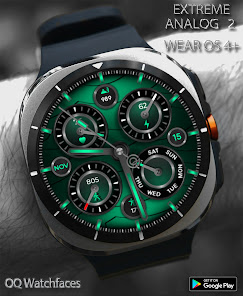
Extreme Analog 2 Wear OS 5+
- OQ Watchfaces
- Google Play 商店
- 付费
- 个性化
=======================================================
NOTICE: READ THIS ALWAYS BEFORE AND AFTER DOWNLOADING OUR WATCH FACE TO AVOID ANY SITUATION YOU DON'T LIKE.
=======================================================
a. Before you buy this watch face you must know this watch face has more than 9 customization menu options and Customization via Galaxy Wearable Samsung Galaxy Wearable app tends not to behave nice randomly with watch faces made in Samsung Watch Face Studio that has more than 5 customization options it happens irrespective of the watch face developer if the watch face has many Customization Options.
DO NOT buy this watch face if you only are used to do customization via Galaxy Wearable app. This bug is present for last 4 years in Galaxy Wearable App and ONLY Samsung can fix it. Stock WFs on Samsung Watches are made in Android Studio & NOT Samsung WF Studio, so this issue does not exist on them. If you bought this WF by mistake or just testing and refund button disappeared after default time limitation. Just email within 48 hours of purchase & get a refund from developer's side. Developers have special privileges to refund customers whenever wanted.
This watch face for Wear OS has following features:-
1. Background Styles Options
10x Light based colored Background Styles including default options are available in customization menu both for Main and AoD Display Separately.
2. Shadow On WF Option
On Top of background has been created and added as a customization menu option by default its off and has 2 more settings besides default.
3. Hands Styles Option
has 4 options including default. Please See Screen Preview no 8 on Phone Google Play Store app of this watch face, all 4 types are shown :-
a. 1st & 4th hand styles colored markers on top of base hands are of luminous nature. and their base color is non colored
b. 2nd & 3rd hand styles colored markers on top of base hands are of non luminous nature. and their base color has colored options also.
4. The hours Index Bars Styles Option
have 7 styles. 1st style is default & follows colors shown in colors options in customization menu. All other Hour Index Bar Styles have been created separately and added along with default style as an option in customization menu.
4. Steps, Heart Rate , Days & Battery Chronographs
a. Chronograph Styles Option
10x styles. 1st style is default & follows colors shown in colors options in customization menu. All other Chronograph Styles created separately and added along with default style as an option in customization menu.
b. Chronograph Needles Color Markers
i.Steps Needle & Battery Color Changes at Following percentages:-
0 to 24% Red
25 to 49% Yellow
50 to 74 white
75 to 90 follows theme
90 to 100 green
ii. Heart Rate Marker Colors Change at:-
0 to 60 Yellow.
60 to 100 Green.
100 to 240 Red.
iii. Days Marker All days Stays Colored according to theme color and on Sunday Changes to Yellow.
5. Chronograph Lights Option
This Option turns Colors On/Off inside Both Chronographs where needles and icons are. Options for both Main & AoD are available separately in customization menu.
6. Tap at 5 o clock hour index bar to open watch phone app.
7. Tap at 7 o clock hour index bar to open watch messaging app.
8. Tap at 11 o clock hour index bar to open watch phone play store app.
9. Tap at 1 o clock hour index bar to open watch Google Maps app.
10. Seconds hand can also be turned off/on fro customization menu.
11. Dim Mode For main darkens the background.
12 Dim Mode for AoD is set to maximum power saving. So it works to brighten up the AOD.
13. 6 x customizable complications are also available in customization menu.
14. Tap inside HR Chronometer to open Heart Rate Counter in Samsung Health App. After you take a reading then chronometer will show accordingly whenever you take a reading. It is not live OS that is how Google has implemented it.
Extreme Analog 2 Wear OS 5+ 使用排名
使用率排名基于 Similarweb 的算法,该算法会计算 28 天内的当前安装量和活跃用户数。
所有品类在
美国--
个性化在
美国--


 Extreme Analog 2 Wear OS 5+ VS.
 四月 15, 2026