

4月16日 的 Packing List - Full 應用程式分析
Packing List - Full
- DotNetIdeas
- Google Play 商店
- 付費
- 旅遊與當地
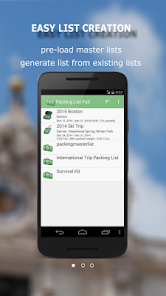
Packing List helps you create and maintain packing lists. It not only lets user to create a list from scratch, but also allows you to generate lists from an existing one. This application comes with several pre-loaded packing master lists. You can simply open the master list(or any existing list). Click on “Generate List/Mass Change” menu item. Check the items you want for your trip and you will have a new packing list ready in no time.
You can group items by category, location and luggage. Each items also has note, quantity and weight fields. Mass change features allow you to edit lists more easily. You may also email and share your lists. Printing out a copy of the lists helps you in case of lost luggage.
Key features include:
• Pre-loaded master lists(for general use, international travel, travel with kids and etc.)
• Create new list from scratch or generate from existing one
• Support Multiple lists
• Share/Sync lists between devices and users(this feature is retiring at the end of 2023. Please see notes below)***
• Reorder categories/items using drag/drop
• Mass change for easy editing
• Group by location/luggage for easy packing
• Backup/Restore lists locally to/from SD card
• Email/Share lists
• Shortcut to particular list from home screen
*** The "list syncing to cloud" feature will be retired at the end of 2023.
We highly recommend trying out our newly redesigned "Packing List 2" app, which offers a seamless and instant automatic sync feature through a new cloud service. You can download "Packing List 2" from the Google Play Store by following this link:
https://play.google.com/store/apps/details?id=com.dotnetideas.packinglist2
This app is available for free with banner ads. If you are a current Packing List full user, the ads will be automatically removed when you register in the new app. Additionally, you can easily migrate your existing lists to the new app.
Please feel free to contact us at support@dotnetideas.com if you have any questions.
***Upgrade from Lite to Full app:
When you upgrade from lite to full, you can use the "Backup and Restore" feature to migrate your data.
To backup your lists, open the lite app and click on "Menu"->"Backup and Restore"->"Backup" in Routine View. Then click on "Backup" to use the default folder or "Select Folder" to choose different location.
Then open the full version, click on "Menu"->"Backup and Restore"->"Restore". It will open default backup location. Choose the folder which contains backup files and click on "Restore". If you have chosen different backup location, then navigate to that location and click on "Restore".
Packing List - Full 使用排名
基於 Similarweb 的算法,根據過去 28 天的安裝數和活躍用戶數進行計算。
所有類別 在
美國#903
旅遊與當地 在
美國#10



 Packing List - Full VS.
 4月 16, 2026