

You’ve hit your search limit
Start your free trial to keep exploring full traffic and performance insights.
Get Started16 Mayısiçin Regal Smart Center uygulama analizi

Regal Smart Center
- VESTEL A.Ş
- Google Play Store
- BOŞTA
- Eğlence
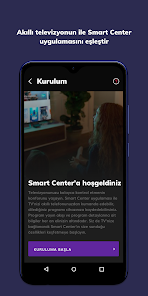
Regal Smart Center is a mobile application developed for Regal Smart TV televisions.
Enjoy the convenience of easily controlling your TV from your smartphone with the app's renewed interface. With the help of Smart Center, information about program broadcasting and program details are always at hand. You can record broadcast programs to watch later(*), set reminders for programs, and share content on your mobile phone with your TV.
Home
• View broadcasts on TV, prime time info, popular applications and recommended contents for you.
• Search for channels and programs.
TV Guide
• View TV guide in an easily readable format.
• View detailed program and channel information.
Program Details
• View detailed info about the content you want, such as cast, genre, time, summary.
• Record programs with one touch and watch it later.(*)
. Set reminder on your TV for the programs you don’t want to miss (*).
Remote Control
• Control your TV remotely with its easy-to-use interface.
• Easily access all basic functions from one screen. Access more functional features with a secondary screen by swiping right the Remote screen.
• With the Netflix, Youtube application shortcut buttons, you can instantly switch to the application you want.
• Searching content made easy with numerical and alphabetical keyboards, and a touchpad.
• Control your TV with your voice command the TV usage hints we recommend.
Applications
• Connect Netflix, Prime Video, Youtube, Twitch, Exxen, BluTV, Y Kids, Amazon Music and more...
FollowME TV
• Watch the TV content on your mobile phone easily.
Media Share
• Send pictures, music or videos to your TV from your mobile phone.
Start exploring the features Smart Center offers you by downloading the app.
In order to use your mobile application, please check the following steps;
1. Make sure your TV is connected to the internet
2. Make sure "Virtual Remote" is turned on in your TV's settings.
3. Make sure your mobile phone is connected to the same WiFi network with your TV.
After checking these steps, go to the Add TV step and repeat the process from the beginning.
Please send any of your feedback as an e-mail to android.support@vestel.com.tr
*This feature is available on supported TVs
Regal Smart Center kullanım sırası
Kullanım sıralaması, Similarweb'in 28 günlük bir süre boyunca mevcut yüklemeleri ve aktif kullanıcıları hesaplayan algoritmasına dayanmaktadır.
Tüm kategoriler içinde
Amerika Birleşik Devletleri--
Eğlence içinde
Amerika Birleşik Devletleri--
En İyi Rakipler & Alternatif Uygulamalar
Aynı mağazadan, aynı kullanıcılar tarafından kullanılma olasılığı yüksek olan uygulamalar.

Universal Remote for Smart TV

Control+

Pro tv box

Harvest Right
 Regal Smart Center VS.
 Mayıs 16, 2026