

You’ve hit your search limit
Start your free trial to keep exploring full traffic and performance insights.
Get StartedNaver SmartBoard - Keyboard análises de aplicativos para 16 de maio

Naver SmartBoard - Keyboard
- NAVER Corp.
- Google Play Store
- Gratuitos
- Ferramentas
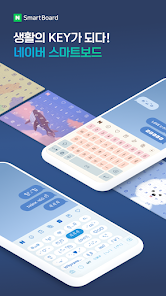
The more you use, the easier it gets. Search and translation are available on the keyboard.
You also can use stickers or your own drawings.
Take a look at NAVER SmartBoard, a keyboard app that just fits you.
1. It gests smarter as you use it.
You can use suggestions from SmartBoard such as words, corrections, or emojis.
Custom texts help you enter long sentences each with a single tap while Quick Keys let your favorite shortened phrases stay in a single key.
You can not only change Korean syllables to Chinese characters but also type with your voice.
2. Search while you keep texting
You don't have to switch to a search app during a conversation.
Finding information of restaurants, movies, weather, and shopping has never been easier.
Stay where you are and get things done!
3. Real-time translation as you type in.
Don't be afraid of texting or emailing with foreigners any more.
Just type in Korean and SmartBoard does the rest translating into English, Chinese (Simplified), or Japanese using N2MT technology.
Using voice recognition while translating is even useful.
4. A single image wins the speech.
Sometimes it's a lot better to show a picture than to describe in words.
Send stickers, gifs, and your own drawings either on a empty canvas or pictures in gallery!
5. Customize your keyboard
Accustomed to a certain Korean layout? SmarBoard supports major Korean layouts such as "2-set Korean", "Danmoum", "Cheonjiin", "Naratgul", and "Vega".
You also can set any images for the keyboard background.
※ Permission Required
- Location: SmartBoard can show the weather around you and local search results.
- Microphone: What you say is transformed to texts using voice recognition.
- Camera: For drawing and text recognition, you can use your camera.
Naver SmartBoard - Keyboard classificação de uso
A classificação de uso é baseada no algoritmo da Similarweb que calcula as instalações atuais e os usuários ativos ao longo de um período de 28 dias.
Todas as categorias em
Estados Unidos--
Ferramentas em
Estados Unidos--
Interesses dos Usuários e Principais Categorias
Principais categorias e aplicativos usados pelos usuários do Naver SmartBoard - Keyboard
Principais Categorias
Afinidade
Principais Aplicativos Dentro da Categoria
17%




15%


14%



13%


Principais concorrentes e aplicativos alternativos
Aplicativos com alta probabilidade de serem usados pelos mesmos usuários, da mesma loja.

Facemoji Emoji Keyboard Pro

Geulgram - Text on Photo

GIF Keyboard by Tenor

Keyboard - Emoji, Emoticons
 Naver SmartBoard - Keyboard VS.
 maio 16, 2026