

Regarder Midnight Business のアプリ分析 5月3日

Regarder Midnight Business
- Regarder Watch Faces
- Google Play ストア
- 有料
- パーソナライズ
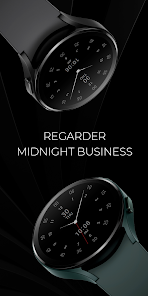
This is a modern minimal hybrid watch face, with a beautiful design that will bring a vibrant and elegant touch to your smartwatch.
HOW TO INSTALL:
1. Please make sure your watch is connected to your phone via Bluetooth
2. Install and hit the dropdown menu, and choose Watch.
*If you are having an issue with synchronization between your phone and the Play store, you can install it directly from the watch. Head over to the Play Store app installed on your watch and search this watch face.
3. You can also install this watch face by accessing the Google Play Store in the web browser on a PC or Laptop.
4. For others clearing the cache of the Play Store app works and for some disconnecting and reconnecting Bluetooth for both watch and phone fixed it.
Please consider that any issues related to installation are not related to the Developer side. They are because of some bugs that Google Play Store has right now, and I hope they will fix them soon!
For support, you can email me at watches.regarder@gmail.com
Watch face features:
- 12/24hr (based on phone settings)
- Date (day of month and day of the week)
- Minimalist Design
- Power Saving Design
Follow me on:
Instagram
https://www.instagram.com/regarderwatchfaces/
Regarder Midnight Business使用ランク
使用ランクは、28日間の現在のインストール数とアクティブユーザー数を計算するSimilarwebのアルゴリズムに基づいています。
業界別 ウェブサイトカテゴリーで
ドイツ--
パーソナライズで
ドイツ--


 Regarder Midnight Business VS.
 5月 3, 2026