

TeslaMirror のアプリ分析 4月15日

TeslaMirror
- Hustmobile
- Google Play ストア
- 有料
- 自動車 & 車両
Enjoy a free 144-hour (6-day) trial of TeslaMirror for Android on Google Play.
When you purchase TeslaMirror for Android on Google Play, you automatically get a 144-hour (6-day) trial period. If you’re not satisfied within 144 hours of purchase, request a refund by emailing TeslaMirror@hustmobile.com with your full order email address or your Google Play order number (e.g., GPA.3366-8888-8888-88888).
The first app on Google Play to support Tesla app mirroring!
TeslaMirror mirrors your Android device to your Tesla vehicle.
Setup
1) Update your Tesla’s infotainment system to the latest version.
2) Ensure your Tesla is PARKED (0 mph / 0 kph).
3) Connect your Tesla to your Android phone’s mobile hotspot. Tesla MCU2/3 hardware is required. MCU2/3 is available on Model 3, Model Y, Model X (built after March 2018), Model S (built after March 2018), or vehicles upgraded from MCU1 to MCU2/3.
• A 5 GHz hotspot is recommended. Tesla vehicles do not support Wi-Fi 6 access points (APs).
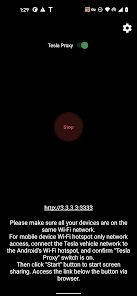
4) Open TeslaMirror and make sure the “Tesla Proxy” switch is ON.
5) Tap “Start” to begin screen broadcasting.
6) In the Tesla browser, access https://TSL6.com (H.264/H.265 mode) or http://100.99.9.9:3333 (MJPEG mode).
Features
• H.264/H.265 recommendations
– MCU3(AMD Ryzen): Use H.265 at 720p@60fps (1080p requires higher bandwidth). MCU3 supports up to 1080p@60fps (H.264) and 1080p@30fps (H.265).
– H.265 playback is supported only on MCU3 or newer hardware. If your Tesla uses MCU3 or better, we recommend H.265 for the best video quality.
– MCU2(Intel Atom): Use H.264 at 540p@30fps.
• Lossless audio (Android 10+ with H.264/H.265 mode)
– Up to Hi-Res quality (96 kHz, stereo, 32-bit), typically much better than Bluetooth or low-bitrate audio.
• MJPEG mode
– Screen mirroring only (no audio). Use Bluetooth for audio.
• Remote Control
– Control your phone with the Tesla touchscreen or a mouse.
FAQ
• Is Netflix supported? No. DRM-protected content support is up to the 3rd-party app.
Warning & Legal Disclaimer
Use this service only when the car is PARKED (0 mph / 0 kph). The use of the built-in vehicle browser may be restricted by local laws and regulations.
Why does TeslaMirror require VpnService (Android)?
Tesla browsers block standard private-LAN IP ranges (e.g., 192.168.*.*). TeslaMirror uses a virtual IP and a VPN tunnel to bypass this limitation. The VPN tunnel does not connect to any public server: one endpoint is your Android device, and the other is your Tesla.
Privacy
A web server runs locally on your Android device at the virtual IP 100.99.9.9. It is not accessible from the public Internet. Only your Tesla and your phone communicate—there are no intermediary servers. TeslaMirror and its VPN component do not collect any user data or logs, and the app does not redirect or manipulate traffic from other apps.
The VPN is the core functionality of TeslaMirror application. Or else Tesla car's browser cannot connect to the web browser on the Android device.
Accessibility (for Remote Control)
The “Remote Control” feature requires Accessibility permission. Without it, Remote Control is unavailable. TeslaMirror uses the AccessibilityService API (e.g., dispatchGesture and performGlobalAction) solely to enable remote touch and system actions. No data is collected through AccessibilityService. This helps you control the device more easily if reaching the screen or physical buttons is difficult.
TeslaMirror使用ランク
使用ランクは、28日間の現在のインストール数とアクティブユーザー数を計算するSimilarwebのアルゴリズムに基づいています。
業界別 ウェブサイトカテゴリーで
米国#877
自動車 & 車両で
米国#11
ユーザーの興味・関心とトップカテゴリー
TeslaMirrorユーザーが使用するトップカテゴリーとアプリ















 TeslaMirror VS.
 4月 15, 2026