

Smart Bookmark: Link Manager のアプリ分析 5月15日

Smart Bookmark: Link Manager
- lonesomebit
- Google Play ストア
- 無料
- 生産性
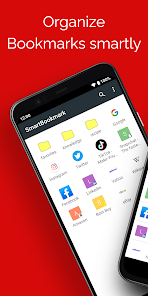
Smart Bookmark is an Android bookmark manager that works independently from browsers like Chrome and Firefox. Can’t find the page you saved? Keep your favorites organized exactly the way you like — with unlimited nested folders, easy sorting, and quick search. Perfect if you use multiple browsers. Because Smart Bookmark manages bookmarks on its own, you can use it with Chrome, Firefox, Opera, Dolphin, and many other browsers. Adding bookmarks is easy: Just choose “Add to Bookmark” from your browser’s Share menu. You can also add items manually from within the app. With Backup & Restore, you can move your bookmarks to a new phone anytime.
Main features
- Add bookmarks with one tap from the browser Share menu (works with Chrome and other standard Android browsers)
- Unlimited folder hierarchy (folders inside folders)
- Reorder items with drag & drop - Choose which browser to open links with (“Open in browser”)
- Search bookmarks - Backup & restore - Automatically fetch favicons
How to back up & restore
Backup
1. Open Smart Bookmark
2. Tap the menu (top right) → Settings
3. Tap “Backup”
4. Choose a save location and tap OK A file named “bookmark.json” will be created.
Restore
First, copy “bookmark.json” to the Android device you want to restore to. (Any method is fine: microSD, Dropbox, Google Drive, etc.)
1. Open Smart Bookmark
2. Tap the menu (top right) → Settings
3. Tap “Restore from backup”
4. Read the warning and tap OK
5. Select “bookmark.json” and tap OK Restore overwrites existing bookmarks. Please back up first.
Note
Due to Android restrictions, Chrome for Android can no longer read or write its bookmarks. Therefore, import/export to Chrome is not supported.
Smart Bookmark: Link Manager使用ランク
使用ランクは、28日間の現在のインストール数とアクティブユーザー数を計算するSimilarwebのアルゴリズムに基づいています。
業界別 ウェブサイトカテゴリーで
ドイツ--
生産性で
ドイツ--


 Smart Bookmark: Link Manager VS.
 5月 15, 2026