

You’ve hit your search limit
Start your free trial to keep exploring full traffic and performance insights.
Get StartedAnalyse de l'application UsA Balancia - USA112 pour le 17 avril

UsA Balancia - USA112
- USA Design Watch Face
- Google Play Store
- Payant
- Personnalisation
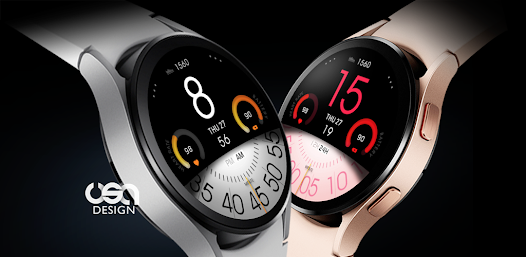
Now available for Wear OS watch, a unique digital and analog combination watch face. Customize the style with an easy menu and make it yours!
This watch face requires Wear OS API 33+ (Wear OS 4 or newer). Compatible with Galaxy Watch 4/5/6/7/8 Series and newer, Pixel Watch series and other watch face with Wear OS 4 or newer.
Make sure you are purchasing using the same Google account registered on your watch. The installation should begin automatically on the watch after a few moments.
After the installation is completed on your watch, do these steps to open the watch face on your watch :
1. Open the watch face list on your watch (tap and hold the current watch face)
2. Scroll to the right and tap "add watch face"
3. Scroll down and find new installed watch face in the "downloaded" section
Features:
- 12/24 hour digital analog style
- Battery Information with gauge
- Heart rate with gauge
- Customize menu for easy styling
- Customize minute blade
- Customize gauge color and hour color
- Custom app shortcuts
- Special Designed AOD, digit color synced with normal mode
Tap and hold the watch face and go to the "customize" menu (or settings icon under the watch face) to change the styles and also manage the custom shortcut complication.
To change between 12 or 24-hour mode, go to your phone date and time settings and there is an option to use 24-hour mode or 12-hour mode. The watch will sync with your new settings after a few moments.
Special designed Always On Display ambient mode. Turn on the Always On Display mode on your watch settings to show a low power display on idle. Please be aware, this feature will use more batteries.
Join our Telegram group for live support and discussion
https://t.me/usadesignwatchface
Rang d'utilisation de UsA Balancia - USA112
Le classement d'utilisation est basé sur l'algorithme de Similarweb qui calcule les installations actuelles et les utilisateurs actifs sur une période de 28 jours.
Toutes les catégories dans
États-Unis--
Personnalisation dans
États-Unis--
Principaux concurrents & apps alternatives
Applications ayant une forte probabilité d'être utilisées par les mêmes utilisateurs, à partir du même store.

UsA Florencia - USA111

Color Ribbon Watch Face

Omnis Digital Watch Face

UsA Florencia Neo - USA174
 UsA Balancia - USA112 VS.
 avril 17, 2026