

Sie haben Ihr Suchlimit erreicht
Starten Sie Ihren kostenlosen Testzugang, um weiterhin alle Traffic- und Performance-Insights zu erkunden.
Los geht'sImgPlay - GIF Maker App-Analysen für 16. Mai

ImgPlay - GIF Maker
- ImgBase, Inc.
- Google Play Store
- Kostenlos
- Fotografie
ImgPlay app is the easiest way to create GIFs using photos and videos.
It is designed for everyone to make GIFs easily.
ImgPlay will make every moment of your photos and videos fully alive.
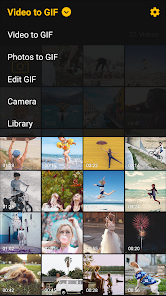
ImgPlay provides a variety of powerful features when creating GIFs such as Video to gif, Photos to gif, and gif editor.
You can cut a portion of your video to create a GIF, or select multiple photos to create a slideshow or GIF. You can also edit existing GIFs.
Apply a filter and create more beautiful and funny GIFs and share with your friends. You can also adjust the frame rate, or change the playback direction to or fro like a Boomerang.
Share your amazing GIFs instantly with your friends on various social networks such as Instagram, LINE, and WhatsApp.
Create an animated GIF with ImgPlay now!
Features
■ Create GIFs in a variety of ways
- Video to GIF
You can convert videos saved in Gallery to GIF.
- Photos to GIF
You can select multiple photos to convert them to a single GIF or create a simple slideshow.
- GIF Editor
Use this when you want to edit the GIF saved in your Gallery. You can edit existing GIFs to. make them more interesting.
- Camera mode
You can shoot a video with various video camera apps installed on your device and instantly create GIFs from ImgPlay.
- From other apps
You can import photos, videos, and GIFs saved in other apps such as Google Drive or Dropbox and convert them directly to GIF.
■ Make GIF funnier
- Apply various filters
You can apply more than 30 beautiful filters to create GIFs and slideshows.
- Edit sections of Frame
You can crop the parts of your choice from the whole frame and turn only a part of it into a GIF.
- Speed Control
You can change the frame play rate from 0.02 second to 1 second.
- Change playback direction
You can set the direction of playback to forward, backward, forward and then backward again (like a Boomerang).
- Add captions
■ Save and Share
- Save as GIF and Video to My Gallery
Low to medium and high resolutions are supported.
- Repeat save
When saving as video, you can choose how many times to save it repeatedly. When you want to upload a GIF to a social network that cannot share GIFs, choose the option to repeat the video multiple times to save and share to make it look like a GIF.
- Share instantly
You can easily share your created GIFs and videos on various social networks instantly.
Have any Questions or Comments? Feel free contact to us anytime at imgplay.and@imgbase.me.
Contact
Email : imgplay.and@imgbase.me
Twitter : https://twitter.com/imgplay
Instagram : http://instagram.com/imgplay #imgplay
[Permissions]
1. Camera: ImgPlay can access to your camera to take a video for making GIF or video.
2. Microphone: ImgPlay can access your microphone to record sound for making GIF or video.
3. Storage Space: ImgPlay can access your all photo or video in Gallery to make GIF or video. GIF or video can be saved in Gallery.
ImgPlay - GIF Maker-Nutzungsrang
Das Ranking der Nutzung basiert auf dem Algorithmus von Similarweb, der aktuelle Installationen und aktive Benutzer:innen über einen Zeitraum von 28 Tagen berechnet.
Alle Kategorien in
Vereinigte Staaten--
Fotografie in
Vereinigte Staaten--
Top-Wettbewerber und alternative Apps
Apps mit hoher Wahrscheinlichkeit, von denselben Benutzer:innen aus demselben Store verwendet zu werden.

Fluc AI: Photo Creator

Artisse - Realistic AI Photos

Promeo - Story & Reels Maker

MOVA - AI Video Generator
 ImgPlay - GIF Maker VS.
 Mai 16, 2026