

SamWatch AD VIII im Vergleich zu Quadro X Watch Face Nutzung und Statistiken
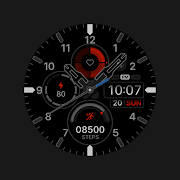
SamWatch Analog Digital Watch Face | Premium Design for Wear OS
IMPORTANT NOTICE
This watch face is supported only on One UI 6.0 or above.
This app is designed exclusively for smartwatches. Users without a compatible smartwatch will not be able to use the watch face after purchase.
WATCH FACE FEATURES
• Premium Analog-Digital Design - Elegant interface combining traditional and modern elements
• Step Counter - Monitor your daily activity levels
• Goal Progress - Track your progress toward daily step goals
• Heart Rate Monitor - Display heart rate data measured by your watch
• Battery Status - Keep track of your watch's battery level
• Customizable Colors - Personalize your watch face with various color options
SAMWATCH INSTALL GUIDE
The 'SamWatch Install Guide' apps are companion applications that facilitate downloading watch faces on Wear OS devices. Please note that the preview screenshots in the guide app may differ from the actual downloaded watch face. Most SamWatch products include smartphone companion apps, and the 'SamWatch Install Guide' only assists in downloading Wear OS applications.
ADDITIONAL INFORMATION
This item includes additional applications for your smartphone that provide:
• Access to Samtree's official website
• Detailed instructions for installing watch faces
• Troubleshooting solutions if the watch face fails to install on your watch
USAGE NOTES
• Depending on your device, an OK button may appear in customize mode
• Heart rate information represents data measured by the heart rate app on your watch
• You can identify supported languages by the SamWatch brand name
• This watch face belongs to the SamWatch Analog Digital AD collection
COMMUNITY & SUPPORT
Connect with us through our official channels:
• Official Website: https://isamtree.com
• X: https://x.com/samtree_watch
• Galaxy Watch Community: http://cafe.naver.com/facebot
• Facebook: www.facebook.com/SamtreePage
• Telegram: https://t.me/SamWatch_SamTheme
• YouTube: https://www.youtube.com/channel/UCobv0SerfG6C5flEngr_Jow
• Blog: https://samtreehome.blogspot.com/
• Korean Blog: https://samtree.tistory.com/
- Google Play Store
- Bezahlt
- Personalisierung
Rang speichern
- -
SkyMax Quadro X Watch Face — This is a hybrid watch face for Wear OS smartwatch. Enjoy the minimalist design on your wrist. Colors and various indicators can be customized, allowing you to create the perfect layout for you!
This app is designed for most Wear OS devices.
*** Install > Select only the clock from the Install drop-down menu. If you see a "Your devices are not compatible" message or have any other installation issues, try using our companion app to install the app on your smartwatch. As a last resort, go to the Play Store in your browser to install.
FUNCTIONS:
› 12 or 24 hour time format depending on your phone settings + seconds
› Date with multiple languages, day of the week
› Battery charge information with indicator
› Heart rate counter, beats per minute level with measurement indicator (indicator level set to 120 beats per minute)
› Step counter and daily steps progress bar (goal set at 10,000 steps)
› Calories burned with achievement indicator
› Always On Display (AOD) supported
PERSONALIZATION:
*** Touch and hold the watch display to customize the watch face.
***For full functionality, please enable required permissions for shortcuts and complications!
› 20 main color options and -- additional
› 4 application shortcuts
› 2 custom complications (add-ons) of your choice - weather, battery, calendar and others
› 4 types of sets of minute, hour and second hands of watches
› 7 component brightness options
NOTES:
*** If after updating the watch face, updating the system or other situations, the step counter or other indicators show “0”, try the following. Touch and hold the watch display to get to the watch face selection menu → select any other available watch face → then remove our watch face from the watch face selection menu (not from the watch) and reinstall it on your watch using your smartphone, from the recently installed watch faces selection menu.
*** If the heart rate or other indicators are also “0”, check the permissions in the settings. “Settings” → “Applications” → “Permissions”, find this watch face and configure the necessary permissions. Also make sure that the watch screen is on and that it is worn correctly on your wrist when measuring your heart rate.
*** CUSTOMIZE WEATHER CONDITIONS. Touch and hold your watch display → Customize → select your main complication and select your weather complication provider.
A weather app must have a weather location installed before it can install a complication.
ADDITIONAL APPLICATIONS:
*** If you want to see on the screen of your watch “the remaining battery charge of your smartphone” and other additions (complications) that are not on your watch, install additional applications from the developer of these applications - amoledwatchfaces™ (all credits belong to the creator of the original application)
• Phone Battery Complication
https://play.google.com/store/apps/details?id=com.weartools.phonebattcomp
• Complications Suite - Wear OS
https://play.google.com/store/apps/details?id=com.weartools.weekdayutccomp
• Heart Rate Complication
https://play.google.com/store/apps/details?id=com.weartools.heartratecomp
• Health Services Complications
https://play.google.com/store/apps/details?id=com.weartools.hscomplications
Join us for live support and discussion:
Telegram https://t.me/skymaxwatchfaces
Instagram https://www.instagram.com/skymaxwatchfaces
- Google Play Store
- Bezahlt
- Personalisierung
Rang speichern
- -
 SamWatch AD VIII VS.
  Quadro X Watch Face
Mai 3, 2026