

Sie haben Ihr Suchlimit erreicht
Starten Sie Ihren kostenlosen Testzugang, um weiterhin alle Traffic- und Performance-Insights zu erkunden.
Los geht's8Bit Photo Lab, Retro Effects App-Analysen für 15. Mai
8Bit Photo Lab, Retro Effects
- Ilixa
- Google Play Store
- Kostenlos
- Fotografie
8Bit Photo Lab converts any picture on your phone or straight from your camera to retro 8-bit pixel art!
Choose a picture, scroll through a selection of pre-defined 8-bit filters and immediately review the vintage effect. Save or share the result in just one click!
Features
★ make pixel art, pixelate your photos, create memes, design flashy posters, have fun!
★ NEW: Live Preview Camera allows you to take shots and record video with the 8Bit effect already applied
★ choose from over 50 color palettes: GameBoy, GameBoy Advance, NES, TO7/70, Amstrad CPC 6128, Apple II, ZX Spectrum, Commodore 16 & 64, VIC 20, CGA, EGA, Atari ST, Amiga, VGA (256 colors)...
★ custom color palettes with the option to interpolate colors, allowing for duotone effects
★ 15 dithering types: error diffusion, noise, pattern, checkerboard...
★ huge finely selectable resolution range from 8 x 8 to 2048 x 2048
★ multiple pixel aspect ratios and attribute clash modes
★ output styles offer alternatives to regular flat pixels: fuse beads, bricks, puzzle, painted...
★ add retro 8-bit text and glitches
★ tastefully decorate with a selection of 8-bit stickers
★ flick right or left and immediately apply the filter to another picture from your collection!
★ high quality output, up to 4096 x 4096 in PNG
★ optional grid overlay for bead artists and cross-stitchers
The app has two goals: be dead simple to use and powerful enough to produce good-looking and effective results.
The reality of old school graphic conversions is that it can be tricky to get good results in all conditions. Low contrast or greyish images tend to be rendered as a murky mess if a straightforward downsampling is applied. 8Bit Photo Lab has a number of parameters that are key to optimizing the final look of your images. Every pixel counts when dealing with low resolution images.
Usage
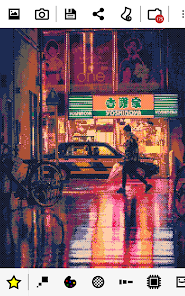
Start off with one of the predefined looks (star icon) then mix and match colors, ditherings, resolutions and more until you get the effect you want.
Change a parameter and the result is immediately updated. Browse through multiple looks in an instant!
The three main parameters are resolution, palettes and dithering. Ditherings allow to simulate a larger range of colors than what the limited palette offers. Various options are offered here. Pattern dithering was often seen used in older paint software as well as the user interfaces for many operating systems. Checkerboard dithering was commonly employed in games. Error diffusion, gives the most faithful rendering.
Four parameters adjust color values for each pixel. You'll find familiar brightness, saturation and contrast settings as well as the very useful local contrast setting (also known as unsharp mask). Local contrast is very effective at bringing out detail and allowing to reduce resolution while retaining good subject definition. As an interesting side effect, reducing local contrast produces a soft focus effect which may take your art in another direction altogether. Giving saturation a boost can help make the most of some of the flashy color palettes.
Cropping will allow you to select just the part of your pic that you like. A tiny part of an image can still have enough resolution to be turned to an 8-bit picture. Even if your subject is small there is hope!
Old computers had few colors to play. They also crashed often in weird ways. Use the glitch menu (blender icon) to add mayhem to your pics. Screen melt, pixel scattering, pixel sorting, cellular automaton, block swapping, RGB offsetting, interlacing are on the menu.
PRO version
Unlocks the following:
★ wallpapers
★ larger range of parameters
★ more ditherings and palettes, including custom palettes
★ extra fonts and borders
★ extra glitches
★ lossless file compression (PNG), higher output resolution (up to 4096 x 4096), 1:1 output resolution
8Bit Photo Lab, Retro Effects-Nutzungsrang
Das Ranking der Nutzung basiert auf dem Algorithmus von Similarweb, der aktuelle Installationen und aktive Benutzer:innen über einen Zeitraum von 28 Tagen berechnet.
Alle Kategorien in
Vereinigte Staaten--
Fotografie in
Vereinigte Staaten#530
Benutzerinteressen und Top-Kategorien
Top-Kategorien und -Apps, die von 8Bit Photo Lab, Retro Effects Benutzern verwendet werden
Top-Kategorien
Affinität
Top-Apps innerhalb der Kategorie
45%




22%


15%


6%





Top-Wettbewerber und alternative Apps
Apps mit hoher Wahrscheinlichkeit, von denselben Benutzer:innen aus demselben Store verwendet zu werden.

MeeAww - AI Photo Editor

Image Toolbox - Edit & Convert

KRUU

SelfieCity
 8Bit Photo Lab, Retro Effects VS.
 Mai 15, 2026