

Sie haben Ihr Suchlimit erreicht
Starten Sie Ihren kostenlosen Testzugang, um weiterhin alle Traffic- und Performance-Insights zu erkunden.
Los geht'sSignalCheck Lite App-Analysen für 11. April
SignalCheck Lite
- Blue Line Computing
- Google Play Store
- Kostenlos
- Tools
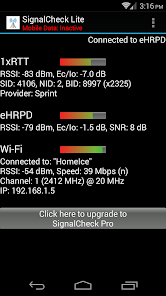
SignalCheck allows users to check the true signal strength of their connections. Unlike the standard Android signal bars, which only display the 1xRTT (voice and low-speed data) signal strength, SignalCheck shows you detailed signal information about all of your device's connections, including 1xRTT CDMA, EV-DO / eHRPD, LTE (4G), HSPA, HSPA+, HSDPA, HSUPA, and other GSM / WCDMA technologies. Data about your current Wi-Fi connection is also displayed, including signal strength, SSID, link speed, and IP address.
Support for 5G networks and dual-SIM devices is coming soon.
Special thanks to S4GRU for their tremendous support of SignalCheck from the beginning! Visit http://www.S4GRU.com for up-to-the-minute information and discussions about Sprint's Network Vision strategy, as well as talk about devices and other cellular networks. There is a SignalCheck discussion thread too.. check it out.
SignalCheck will display LTE Cell ID information on most devices running Android 4.2 or higher, and some HTC devices on earlier Android versions. SignalCheck was one of the first (if not THE first) Android apps to provide this information to users. LTE band information is available for some providers, and frequencies are displayed on some HTC devices.
SignalCheck also displays the current connection type along with the provider name for each connection, even while roaming.
Users can upgrade to SignalCheck Pro (available here) for less than what a cup of coffee costs these days. The Pro version includes lifetime upgrades, and the following enhancements:
* Pro: Significantly faster access to program updates. Lite users will receive updates as needed, but the Pro version is always released first -- sometimes months in advance.
* Pro: Ability to see "neighbor" cells that are in range of your device, but you are not currently connected to.
* Pro: Ability to save a log of connected sites, and enter a "note" for each site that will be displayed in the app (ie "Springfield High School Tower"). Notes also display on neighbor cells.
* Pro: Ability to set alerts based on connection status and LTE band.
* Pro: User-customizable icon(s) show your data connection information in the notification area at the top of the screen, and more details can be seen in the pulldown menu. Your signal strength is always at the top of the screen along with your other icons.. no need to open the app to check your connections. These notifications can be configured to automatically run your device boots if you choose to do so.
* Pro: The ability to automatically keep the screen on while SignalCheck is in the foreground.
* Pro: The ability to display your base station location (CDMA 1X site or sector location) street address, and instantly show it in your favorite mapping app by tapping on it.
* Pro: Easy access to advanced Android screens such as Engineering debug/data screens, Battery Info, Field Trial, Mobile Networks, Wi-Fi info, and more. These screens are already available on most Android devices, but are only accessible by special dialer codes.
* Pro: An option to quickly reset your data connections from within the app -- but your device MUST be "rooted" for this feature to work on Android 4.2 and up.
* Pro: A configurable widget can be placed on any home screen, showing current connection type and realtime signal strengths. Each field is color-coded so signal information can be checked with a quick glance.
We are always looking for feedback, including suggestions and bug reports.. compliments are always welcome too.
This app has also been referred to as Signal Check, Signal Check LTE, LTE Signal Check, LTE Checker, among other things.. it's just SignalCheck folks.
cellular, mobile, antenna, tower, site, Sprint, Verizon, AT&T, T-Mobile, HTC, Samsung, Galaxy, LG, Motorola, Google, Pixel, Nexus
SignalCheck Lite-Nutzungsrang
Das Ranking der Nutzung basiert auf dem Algorithmus von Similarweb, der aktuelle Installationen und aktive Benutzer:innen über einen Zeitraum von 28 Tagen berechnet.
Alle Kategorien in
Vereinigte Staaten--
Tools in
Vereinigte Staaten--
Top-Wettbewerber und alternative Apps
Apps mit hoher Wahrscheinlichkeit, von denselben Benutzer:innen aus demselben Store verwendet zu werden.

QmetaRam AI: Quantum Assistant

Rosecrance Alumni

talque

Travogram
 SignalCheck Lite VS.
 April 11, 2026