

Tancha S80 Watch Face vs KZY102 Usage & Stats
Tancha S80 Watch Face
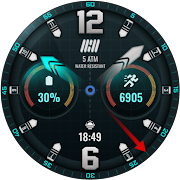
The perfect looks and easy-to-read watch face.
This watch face is developed by Tancha Watch Faces for use on Wear OS devices.
FEATURES
Analog Watch Face
* Analog time.
* Color customizations.
* Custom Complications.
* Custom Flags.
* Step counter.
* Visible Always on view.
FAQ :
1- The watch face is installed on your watch but does not appear in the catalog?
FOLLOW THESE STEPS:
Press and hold your watch screen.
Swipe right until you see the text 'Add watch face.'
Press the '+ Add watch face' button.
Find and activate the watch face you installed.
2- If the companion app is installed but the watch face is not, follow the steps below:
FOLLOW THESE STEPS:
Open the companion app on your phone (ensure that your smartwatch is connected to your phone).
Next, tap the 'INSTALL WATCH FACE ON WATCH' button at the bottom of the app.
This will open the Play Store on your WEAR OS smartwatch, displaying the purchased watch face and allowing you to install it directly.
If you have any questions or requests, please don't hesitate to get in touch with me at tanchawatch@gmail.com.
Your feedback is highly valuable to me.
Thank you sincerely for your support.
Best regards,
Tancha Watch Faces
- Google Play Store
- Paid
- Personalization
Store Rank
- -
KZY102 is made for Wear OS
Watch face setup notes on smartwatch: The Phone app just acts as a placeholder to make it easier to set up and find the watch face on your Wear OS watch. You must select your monitoring device from the setup drop-down menu
Dial Features:Different color options-Customization Options-Alarm-Message-Steps-Power-Pulse-Digital Dual Time-Date-Weather complications-Analog clock-Aod Screen-For Wear OS
Watch face customization:1- Touch and hold the screen2- Tap Customize
Some features may not be available on some watches. This watch face is suitable for Samsung Galaxy Watch 4,5,6, Pixel Watch etc. It is compatible with. Supports all Wear OS devices with API level 30+
If the watch face still doesn't appear on your watch, open the Galaxy Wearable app. Go to the Downloads section of the app and you will find the watch face there. Just click on it to start the installation.
- Google Play Store
- Paid
- Personalization
Store Rank
- -
 Tancha S80 Watch Face VS.
  KZY102
May 3, 2026