

You’ve hit your search limit
Start your free trial to keep exploring full traffic and performance insights.
Get StartedSpeedlimit 88 GPS Speedometer app analytics for May 3

Speedlimit 88 GPS Speedometer
- Ben Thomas
- Apple App Store
- Free
- Navigation
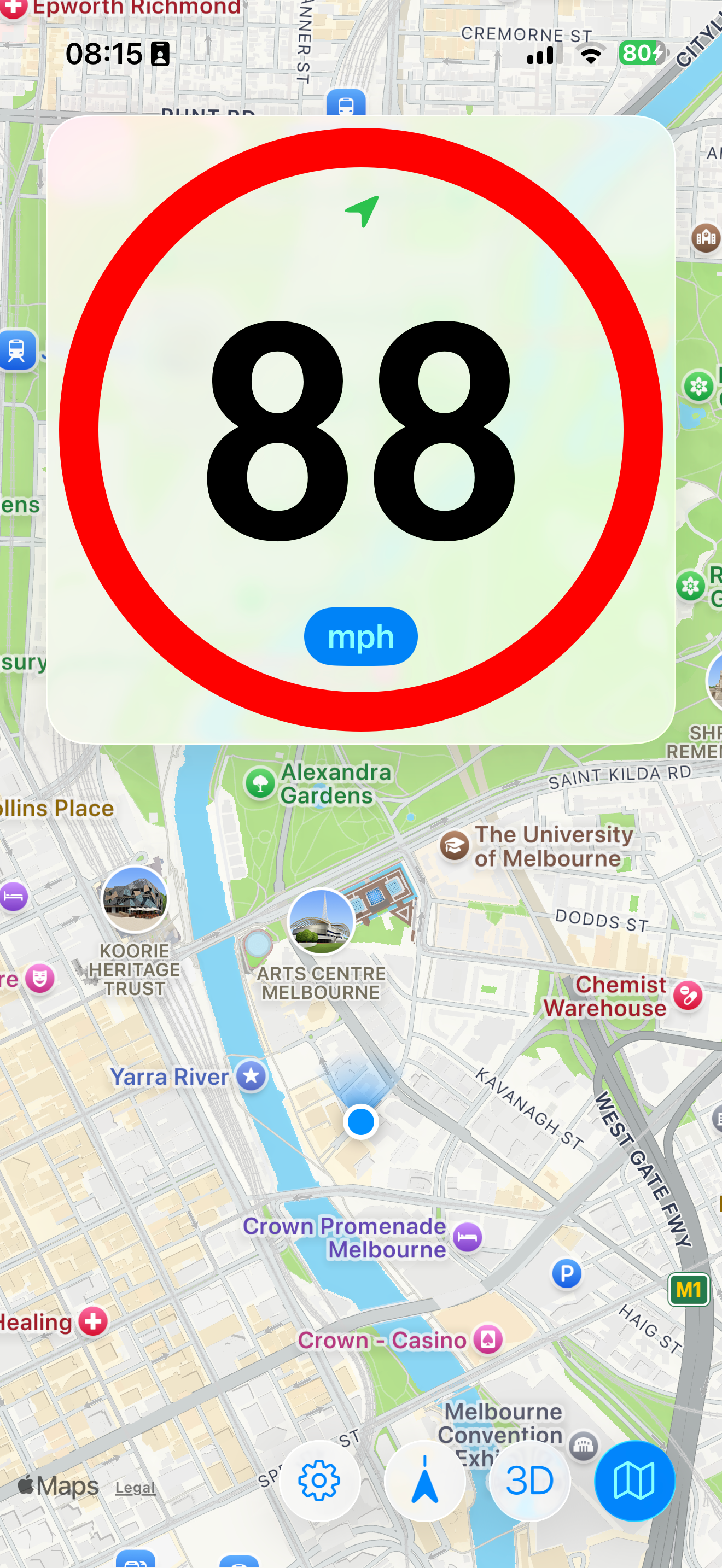
Since 2015, Speedlimit 88 GPS Speedometer has been the goto speedometer app for your iPhone and iPad ¹ designed to look like Australian (and probably other) speed limit signs.
Perfect for when you're driving your car, riding on your bicycle, jet ski, or even on the luge for a quick commute down the mountain - basically any vehicle you can ride under the sky. OK, runners can use it too. Does not work in tunnels...
This amazing app has 6+1, yes SIX PLUS ONE features!
Always free:
1. Your GPS detected speed in a Big. Red. Circle.
2. Speed in km/h
2. Speed in miles per hour
3. A day theme
4. A night theme (tap the speed reading to toggle)
6. And last but not least, an accuracy indicator that changes from green to orange to red (hold on that's three separate features right there) to show the GPS location accuracy. If it's not green, the speed accuracy will reduce and update less frequently.
You're free to test drive the Map feature for 30 minutes, then an inexpensive In App purchase for unlimited use with NO RECURRING SUBSCRIPTION.
If you won't use the map but want to give me a small tip, please buy. I'm just one guy - not a company.
Here's what you can do with the map:
1. Tap the map button to enable the map. At the same time as the speedometer. Seriously.
- Tap again to toggle to a smaller speedo size, and tap one more time to hide the map
2. View your current location on the map, with or without traffic, or in satellite mode
3. Drag to browse around the map and see businesses and other points of interest
4. Tap the location button to recenter the map on your location
5. Tap the location button again to rotate the map to follow the direction you are going
6. Switch between 2D and 3D mode
That's at least 6 more features. I've run out of fingers to count them all!
Do you have other feature requests? Please email me at support@thomases.id.au. I'd love to hear from you.
* To have access to the GPS please grant permission to access your location - like all other navigation apps.
* Use of the map will require a cellular or wifi data connection.
¹ Accurate updates of the GPS (and your speed) require a cellular enabled device - wifi only iPads will not update the speed frequently. Please note that the speed displayed is only as accurate as the speed reading in your iPhone. This app is not a legal speed measuring device and should not be used as a substitute for your car's speedometer. Car speedometers are often inaccurate too.
Store Rank
The Store Rank is based on multiple parameters set by Google and Apple.
All Categories in
United States--
Navigation in
United States--
Top Competitors & Alternative Apps
Apps with a high probability of being used by the same users, from the same store.

Speedometer Limit Camera

GPS Speedometer HUD

Speedometer: Speed Tracker Pro

GPS Speedometer & Mile Tracker
 Speedlimit 88 GPS Speedometer VS.
 May 3, 2026