


5月22日的Travel Planner - enot66应用程序分析

Travel Planner - enot66
- Ian Lipliavyi
- Apple 应用商店
- 免费
- 旅游
Free, no in-app purchases, no email address required, no email newsletters, no ads, and full functionality without registration.
What is it?
This is a very useful app for any traveler.
Really?
Let's look at a couple of the app's screens. The description includes images that can be used for illustration purposes.
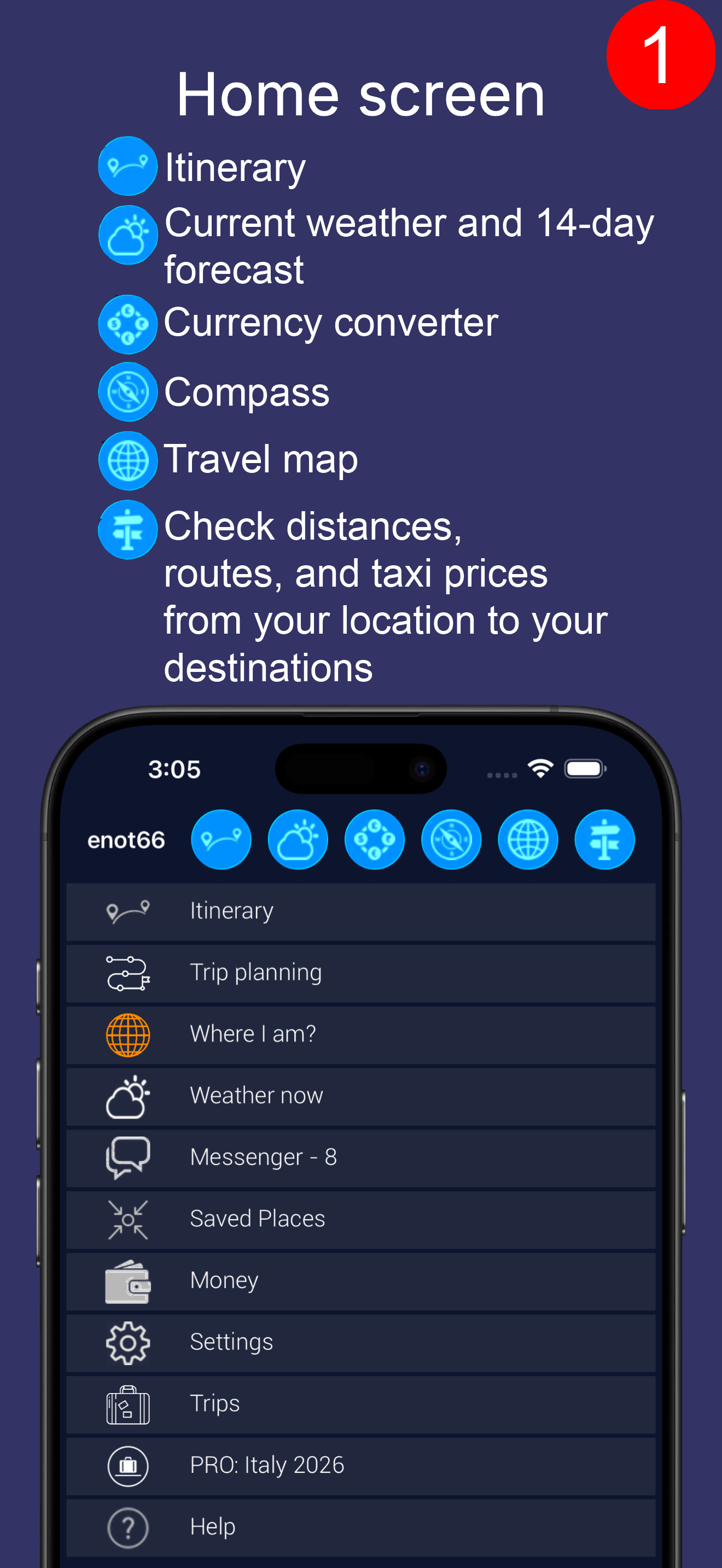
First, the main screen (image #1). You have access to buttons without a menu:
- Itinerary.
- Current weather and 14-day forecast.
- Currency converter.
- Compass.
- Trip map centered on your current location.
- Routes - check distances to travel destinations from your current location (distance, direction, route, taxi fare).
View itinerary (image #2).
You can view:
- Entire itinerary
- Today's itinerary (if any)
- Tomorrow's itinerary (if any)
- Personal itinerary (if any)
- Documents, if you've uploaded them (e.g., booking confirmations).
The itinerary itself (image #3).
Several viewing options (from the toolbar icons):
- Entire itinerary. Useful for planning.
- Itinerary starting from today. Useful for traveling.
- Outliers. Points of interest without dates. For example, restaurants, beaches, ATMs, shops, etc. In the first two options, they are at the bottom of the list of travel points in the "Points of interest without dates" section. However, you can view them individually.
- Plus icon. You can add flights, hotels, attractions, etc. to your itinerary.
Note the icons on the itinerary cell (bounded by lines, image #3); these also provide options for each point of interest in the itinerary (image #4):
- Open flight tracker (for flights). Before, during, and after your flight.
- Call a Lyft or Uber from you to this location.
- Copy the coordinates or address of the location for use, for example, in other taxi apps to get to this location.
- Open the GPS app with this location as your destination and navigate there yourself.
- Check the weather forecast for your stay at this location. For example, for the day of your flight or during your hotel stay.
- Open the internal travel map with this location as the center (travel geography).
- Open the external Apple Map/GPS app.
Menu icon. This is what didn't fit in the cell:
- Google Street View
- Google search
- Current weather at this location and a 14-day forecast
- Nearby cities
- Search for various points of interest near this location (restaurants, gas stations, ATMs, beaches, parks, attractions, etc.)
- Routes - not from you, but from this location
- Photos taken in the vicinity of this location.
So, for each item in your itinerary, you have 14 functions available, all within one or two clicks (from the menu).
And, of course, if you click on the cell itself, you'll get a description of the item and more.
Convenient?
And that's just one app screen; there's much more to it.
Remember, it's all free, with no ads, no annoying emails, and no in-app purchases?
Naturally, you can invite friends to your trip and join theirs.
And even without registering, you can add other devices or browsers.
If you prefer planning trips on a computer, the same functionality is available at enot66.com.
Have a great trip!
商店排名
商店排名基于 Google 和 Apple 设置的多个参数。
所有品类在
美国--
旅游在
美国--


 Travel Planner - enot66 VS.
 五月 22, 2026