

5月25日的AEDProSense应用程序分析

AEDProSense
- Galileo Systems Group Corporation
- Apple 应用商店
- 免费
- 健康与健身
Application Summary:
The AEDProSense app is an integrated cloud based system designed to be used by AED program managers and technicians to enhance the survivability of SCA (Sudden Cardiac Arrest). According to the American Heart Association there are 356,000 out of hospital SCAs that occur each year with 90% of these being fatal. AEDs (Automated External Defibrillators) can change this paradigm but only if a responder knows where the AED is, know how to use it and knows that it is working. Our product hopes to aid in this battle by providing an easy to use cloud enabled app to close the “know” gap and save lives.
AEDProSense App Operation:
The AEDProSense app is used in conjunction with a QR Code to tag the AEDs that are to be monitored. When the app loads and the user is authenticated a map is presented of all AEDs that were setup and associated with the authenticated user. There are two options to view the associated AEDs, the default is the map view, the user can switch to the list view which shows all available AEDs in a list view.
To setup a new AED and use the app the user must have valid login credentials on our associated identify server. There is currently no self-service login feature the user must already be established before they can use the app.
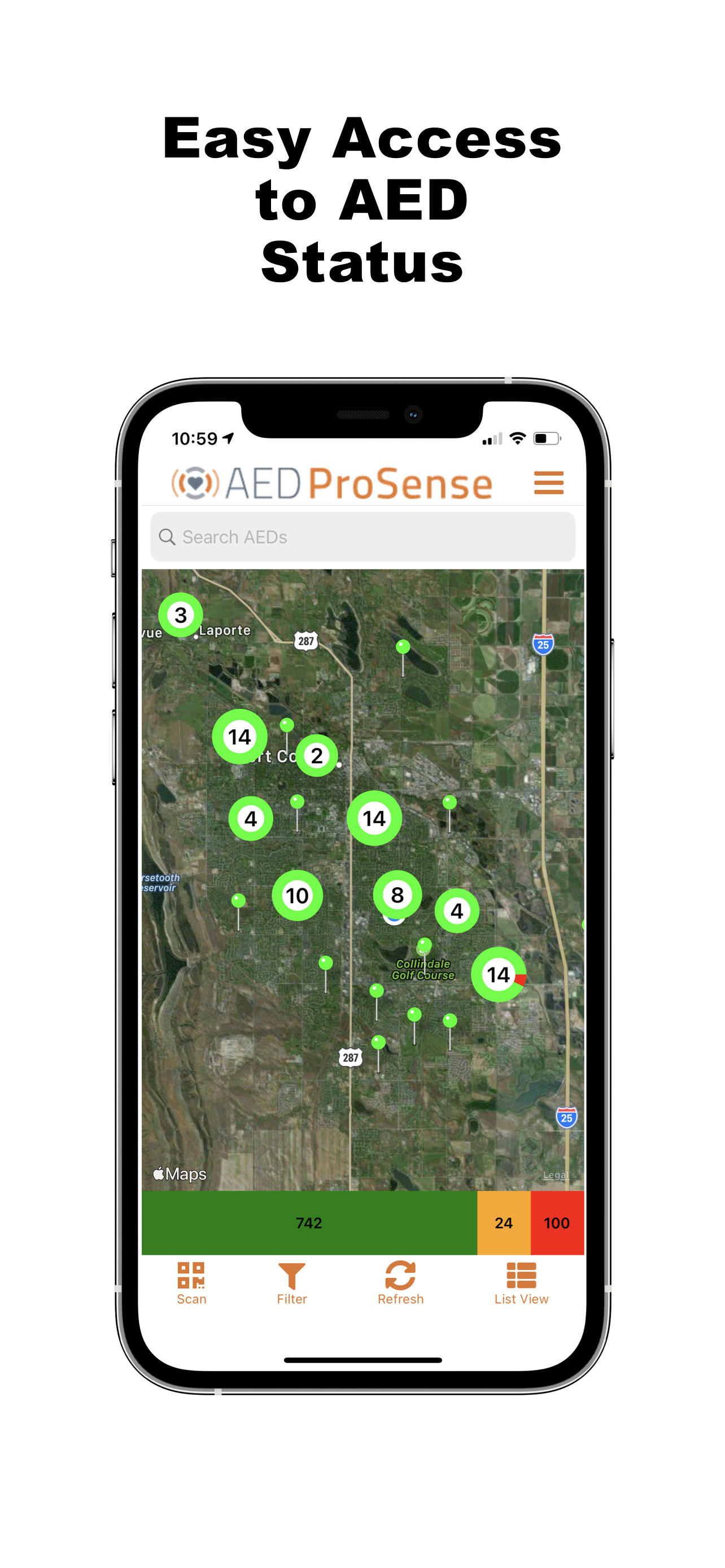
Once authenticated the user is presented with a map or list showing all the associated AEDs as pins in the map or as individual lines in the list. On the map, when these pins are close together they are clustered and the number of AEDs in the cluster is shown surrounded by a pie chart representing the three possible conditions that the AED is in.
Red - There is a critical issue and the AED needs attention immediately
Yellow - There is a warning condition please check the AED soon
Green - There are no issues with the AED
The main screen has a search bar at the top of the screen that allows the user to search the Name/Locations of the AEDs. At the bottom of the map or list of AEDs, is a color coded bar graph that shows the status of the AEDs listed. These bars represent all visible AEDs based on the search criteria or filter set by the user. Touching one of the colors in the graph further filters the map or list view to only include the AEDs in that status.
At the top of the screen to the right of the AEDProSense logo is a hamburger menu that can be selected to view additional functionality.
At the very bottom of the map are navigation and action icons.
From left to right they are:
A QRCode icon with a label that reads: “Scan” - this activates the camera to scan an AEDProSense style QRCode
A Funnel icon with a label under it that reads: “Filter” - to filter on Organizations (if the user has access to more than one Organization) and Sites (if the Organization has one or more associated Sites)
Refresh - Refresh the information associated with the all the AEDs to which the user has access
A Map icon with a label under it that reads: “Map View” when the main page is showing the AEDs as a list or
A List icon with a label under it that reads: “List View” when the main page is showing the AEDs as pins on a map
On the Map view the user can select an individual pin representing and AED and view the associated information or a cluster of pins representing a group of AEDs that are close together based on the map zoom and view all associated AEDs in a list view screen
When the main screen is a List View, the user can select an individual row representing the AED and view associated information for that AED.
商店排名
商店排名基于 Google 和 Apple 设置的多个参数。
所有品类在
美国--
健康与健身在
美国--
AEDProSense五月 25, 2026