

5月31日 的 BT Basketball Shotclock 應用程式分析

BT Basketball Shotclock
- The Basketball Temple LLC
- Google Play 商店
- 付費
- 體育
One of the cleanest shotclock apps on the market. The BT Basketball Shotclock app, developed by a basketball company that runs it's own basketball leagues, is the next best option to investing in an expensive professional grade shotclock. Shotclock and Scoreboard equipment which can cost you thousands is now available and affordable to everyone in the basketball community. Available on Android TV!
Use the shotclock by itself or download the free BT Controller app to remotely control the shotclock or multiple shotclocks simultaneously. Open the connect menu on the BT Controller app, the shotclock is automatically detected, hit the WiFi or Bluetooth button next to the shotclock name on the BT Controller app to connect.
BT Shotclock Features:
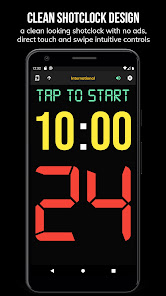
- Clean design, no ads
- Can use as a stand alone shotclock with intuitive direct tap and swipe controls
- Remotely control shotclock with WiFi or Bluetooth using free BT Controller App
- Convenient Presets (International, 3x3, US Pro, College, High School, and more...)
- Convenient timers: pregame timer, period timer, rest timer, timeout timer, overtime, etc.
- Fully customizable game in the settings
- Practice modes configured in settings is great for running practices
- Audio buzzers for shotclock violation, end of period, substitutions, etc.
- Warning beep near end of pregame, timeout, or rest times (customizable)
- Quick Start Documentation below
For the best experience, use the application on a large tablet, or hook your phone/tablet up to a large display or video projector. You'll feel like you have just bought a professional shotclock!
Synchronize the shotclocks with our BT Scoreboard app to run a full-blown basketball game with scoreboard and shotclocks.
The BT Shotclock app was created by The Basketball Temple Company. The Basketball Temple Company focuses on high quality basketball academies, basketball leagues, and technologies that are used to support those academies and leagues. We open our technology to the public so everyone in the basketball community can experience the same technologies that we use within our institutions.
# Quick Start Documentation:
Time Controls:
- Tap period timer to start/pause
- Tap pregame, timeout, rest timers to early transition to next stage
Shotclock Controls:
- Tap shotclock to reset/go
- Swipe shotclock up/down to reset/go to short shotclock
Connect and Remote Control:
- Start the BT Controller app on a different device
- (If using the BT Scoreboard app as the controller device then these steps should be done on the BT Scoreboard instead)
- On the controller device, open the connect menu on the top left
- The Shotclock should automatically discovered
- Click on the Wifi/Bluetooth icon next to the Shotclock name to connect
- If unable to connect or having connection errors try one of the following:
1) please ensure all devices are on the same WiFi network
2) please ensure bluetooth is turned ON on all devices
3) lastly, try to restart the app on all devices
Time and Game Settings:
- Tap on top-right icon (or swipe right-to-left on the right edge) to open settings menu
- Edit and save the many settings available
# Tutorial Video (BT Controller connect to and control devices)
YouTube Tutorial Video
BT Basketball Shotclock 使用排名
基於 Similarweb 的算法,根據過去 28 天的安裝數和活躍用戶數進行計算。
所有類別 在
美國--
體育 在
美國--


 BT Basketball Shotclock VS.
 5月 31, 2026