


GPS Status & Toolbox 與 Altimeter for Aviators 使用情況與統計
The number one GPS toolbox arrived to iOS!
Displays all the GPS and sensor data you ever were curious about: position of GPS and GLONASS satellites, accuracy, speed, acceleration, altitude, bearing, pitch and roll. Find and save your locations based on coordinates or actual position and navigate to them later.
Tools provided: compass with magnetic and true north, leveling tool, waypoints. You can mark or share your location using the Radar (especially useful for geocaching or quickly saving your actual position).
- Apple App Store
- 付費
- 旅行
商店排名
- -
If you want a 'real' Altimeter, look no further. No GPS used here.
Learn how a real pressure Altimeter works such as you would find in an aircraft. Altimeter for Aviators is primarily designed as an Apple Watch application, although it does also work on iPhones or iPads that have a barometer. Provided your watch has a Barometer it will even run stand-alone (no iPhone needed).
Student and instructor pilots will find this App to be a valuable training tool, while those knowing how to use an altimeter will enjoy having it on their wrist.
To obtain your Altitude (height above sea level):
Set the 'pressure setting' to the current air pressure at sea level. Weather forecasts often give this (eg the BBC Weather App includes pressure in mb). You can also obtain the pressure from weather pressure charts or from METAR reports from airports (eg Q1017). In aviation speak, this is known as the QNH. Set the pressure setting by rotating the 'crown' on your watch. You can then 'Lock' this setting so you don't accidentally change it by doing a long-press and choosing 'Lock'. Alternatively, if you know the altitude of the point that you are currently at, you can rotate the watch crown until the Altimeter reads the correct altitude.
To obtain your height above a certain location:
Set the 'station' pressure for that location (the actual air pressure at that very point). Aviation language calls this pressure setting QFE. If you are at that location, you can just rotate the crown of the watch until the Altimeter reads zero. As a short-cut you can alternatively long-press and then pick "Zero (QFE)".
To obtain your Flight Level (FL):
Another setting that pilots use is the standard setting of 1013.25mb. This is used above 3000ft roughly and instead of giving you an accurate 'Altitude' gives you what is known as a 'Flight level'. Long-press and select the "STP (FL)" option as a short cut (FL stands for Flight Level. STP stands for 'Standard Temperature and Pressure').
If you are more familiar with inches of mercury (inHg) rather than hectapascals (hPa) or millibars (mb) then toggle this with the 'Units' menu item. Note that mb and hPa are the same unit.
ACCURACY WARNING:
Your watch (or iPhone) pressure sensing device has not been calibrated in the same way that the expensive altimeters found in aircraft have been. Your electronic device also has more points of failure and error being miniature and electrically based so this App in no way replaces or can be used for actual flying. If you run this App side by side on two different iOS devices, the chances are they'll give you slightly different altitudes. Further, if you're a pilot the pressure in your cockpit is unlikely to be as accurate as the location of the static pitot tube and will be susceptible to changes due to air vents being opened, doors with gaps, any climate control, your speed and any vibration.
WEATHER WARNING:
Air pressure changes throughout the day can cause readings to drift by up to 1 foot per minute, so keep the pressure-setting up-to-date by updating it whenever you can; as you get to any locations of known altitude or hourly if receiving pressure settings in some other way.
Colours:
Altimeter for Aviators shows how recent the altitude was calculated (it's not constant)
White = updated in the last 10 seconds
Yellow = updated between 10 and 60 seconds ago.
Pink = updated between 1 and 10 minutes ago.
Dark Red = updated more than 10 minutes ago.
Altitude units:
The long hand shows 100s of feet. The short hand 1000s of feet. The inward pointing edge arrow shows 10000s of feet. The barber pole (stripe at the bottom) is visible below 10000 feet, so if it disappears you are at risk of Hypoxia.
- Apple App Store
- 免費版
- 導航
商店排名
- -
GPS Status & Toolbox與 Altimeter for Aviators 比較排名
比較過去 28 天的 GPS Status & Toolbox 排名趨勢與 Altimeter for Aviators
 GPS Status & Toolbox#46
排名
各國 GPS Status & Toolbox vs. Altimeter for Aviators 排名比較
比較過去 28 天的 GPS Status & Toolbox 排名趨勢與 Altimeter for Aviators
所有類別
旅行
使用我們的免費試用版,與所有網站進行比較
GPS Status & Toolbox VS. 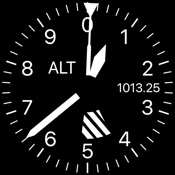 Altimeter for Aviators
8月 30, 2026