

You’ve hit your search limit
Start your free trial to keep exploring full traffic and performance insights.
Get StartedQR Menu Barcode Maker Creator análises de aplicativos para 18 de maio

QR Menu Barcode Maker Creator
- Cevahir Turgut
- Apple App Store
- Gratuitos
- Serviços básicos
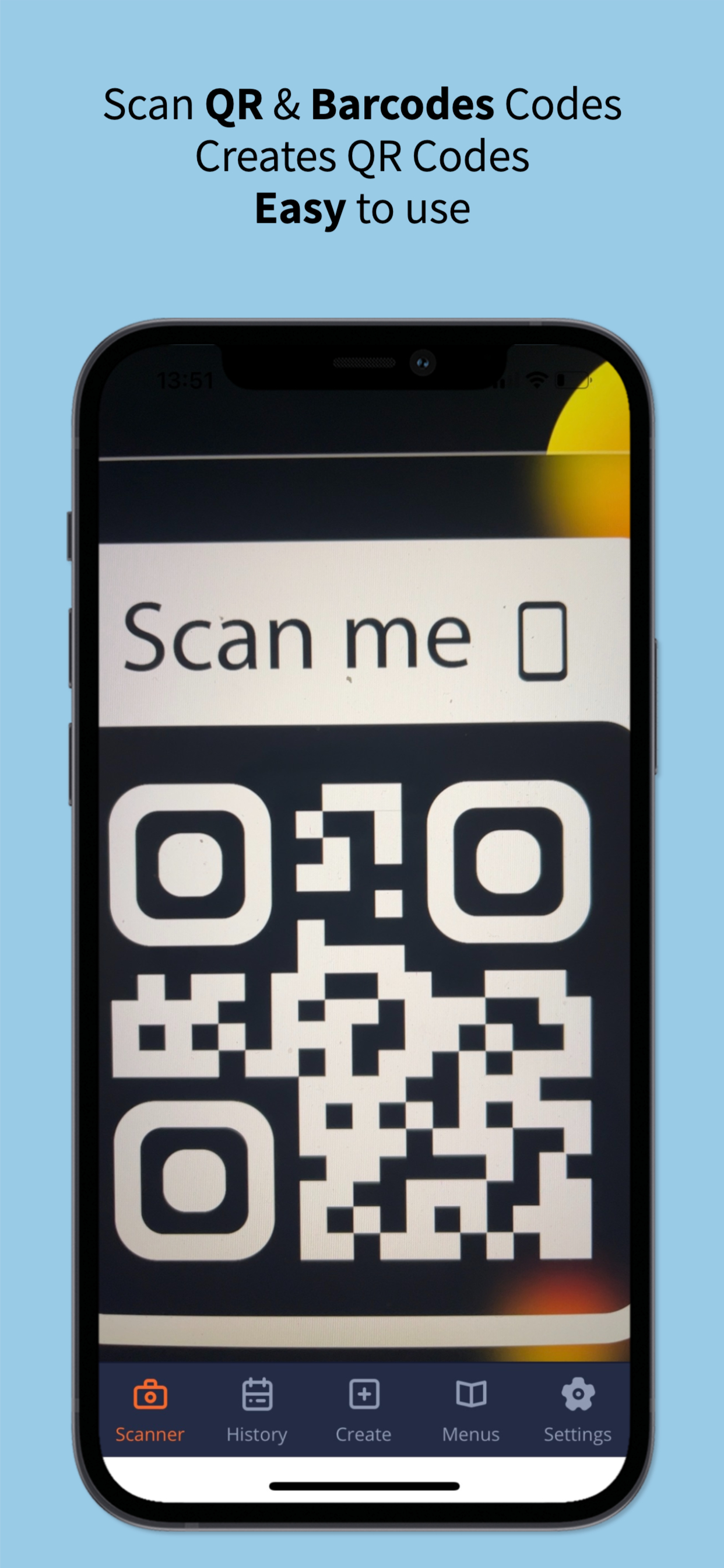
QR code reader, barcode scanner app focuses on the core functionality to scan and read the most common types of QR codes and barcodes with super fast speed and delightful user experience, designed for all iOS devices.
QR code reader, barcode scanner app is extremely easy to use. It simply uses the iPhone's or iPad’s camera to scan and read QR code and barcode in a second then allows you to do appropriate actions effectively.
QR code scanner, barcode scanner app helps you to scan and read all types of QR code and barcodes: Contact Info, Phone, Email, Website, Text, SMS, Wifi and more…
QR code scanner, barcode scanner app doesn’t collect any personal information or access to your device storage, contact list, or anything else. It’s simply a QR code reader app to help you scan QR codes and scan barcodes on the go, everywhere, using iPhone and iPad.
QR code scanner, barcode reader app also has a QR generator feature allowing you to generate your own QR codes with different types easily.
Super-fast, super-lightweight, and easy to use
Appropriate actions on each QR code or Barcode: open a webpage, send an email, call a phone number...
History with search
Setting options to ensure the scanner is optimised for your own settings: vibrate on scan, copy scanned data to clipboard
QR code generator: generate QR code using your iPhone or iPad
Auto-detect scanning. Simply point and hold
Share using email, messenger, Facebook or Twitter
How to Use:
- To scan a QR code or barcode, simply open the QR scanner and barcode scanner app, point the camera in front of the QR code or barcode, and the app will automatically read the code and show you its content efficiently.
- To scan images from your device's gallery or even from content in any other apps, simply use the "Share" functionality in the menu: click the "Share" option and select app to share, share the scanned content
- To generate QR codes: simply open the QR code reader and barcode reader app -> select “Create” at the bottom menu. There are many types of QR codes that you can generate based on your needs, such as contents from clipboards, website / URL, text, contact information, phone number, SMS and wifi... The QR code is created, and you can share it with your friends
- History feature allows you to view all the QR codes and barcodes that have been scanned from the QR code reader and barcode reader app. The history is organised clearly thus helping you to find your information as efficiently as possible.
- Menu feature allows you to keep scanned MENUs at the different tab. This allows you to find scanned MENU at cafe, restaurant, bar easily.
- In the settings menu, there are many options to optimize the QR code reader and barcode scanner app for your own device as well as your preferences.
Supported formats:
aztec
code39
code93
code128
code39mod43
datamatrix
ean13
ean8
interleaved2of5
itf14
pdf417
upc_e
qr
Privacy Policy: https://kidomido.com/index.php/privacy-policy-for-scan-me/
Term of Use: https://kidomido.com/index.php/terms-of-services-for-scan-me/
Support and Contact: scan-me@kidomido.com
Ranking da Loja
A Store Rank é baseado em vários parâmetros definidos pelo Google e Apple.
Todas as categorias em
Estados Unidos--
Serviços básicos em
Estados Unidos--
Principais concorrentes e aplicativos alternativos
Aplicativos com alta probabilidade de serem usados pelos mesmos usuários, da mesma loja.

QR - Barcode Scanner & Creator

QR Scanner and Code Generator
QRCode G

QR Tool - Reader & Generator
 QR Menu Barcode Maker Creator VS.
 maio 18, 2026