

You’ve hit your search limit
Start your free trial to keep exploring full traffic and performance insights.
Get StartedPixen - pixel art editor análises de aplicativos para 18 de maio

Pixen - pixel art editor
- Furnace Creek Software LLC
- Apple App Store
- Gratuitos
- Gráficos e design
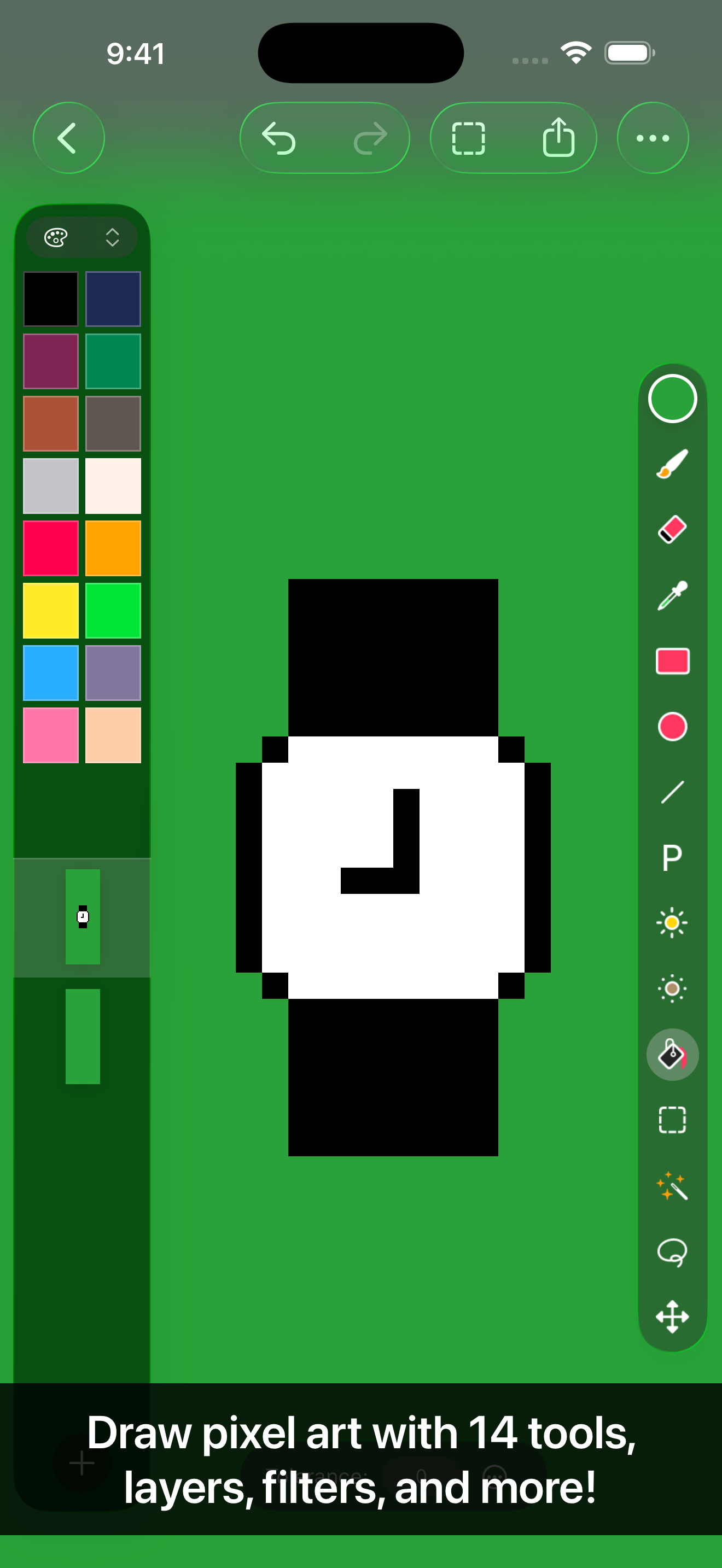
Pixen is a native pixel art editor for iOS and macOS, designed for working with low-resolution raster art such as those 8-bit sprites found in old-school video games. Pixen packs all the tools pixel artists need in an intuitive, native interface including support for high zoom levels, animation editing, color palettes, and a lot more.
PROJECTS GALLERY
The Pixen experience starts in the projects gallery, which allows you to manage all of your creations in one place. You can import and export files in various file formats including PNG, JPEG, GIF, ICO, BMP, TIFF, SVG, and PSD. Files can be imported from your Photos library, the Files app, or the clipboard. Pixen for macOS users can take advantage of seamless iCloud sync. When you're ready, you can share your creations with friends.
TOOLS AND APPLE PENCIL
Leverage Pixen's wide array of tools when composing pixel art: Pencil, Eraser, Brightness, Text, Eyedropper, Zoom, Rectangular Selection, Magic Wand, Lasso, Move, Fill, Line, Rectangle, and Ellipse.
All of Pixen's tools are fully compatible with Apple Pencil on iPad. You can take advantage of the double-tap gesture on Apple Pencil 2 to quickly switch to your last tool, switch to the eraser, or bring up the color picker. Pixen even has hover support when using Apple Pencil Pro, so you can see a preview of what you're about to draw before your Apple Pencil touches the screen.
COLOR PALETTES
With Pixen, you can add and organize commonly-used colors into palettes. Pixen can also import and export color palettes in the Adobe Color Table, Microsoft Palette, JASC Palette, and GIMP Palette formats. You can even perform palette operations such as sorting colors and removing duplicate colors directly in the app.
ANIMATIONS
Create and arrange image frames in the filmstrip view to piece together animations. Pixen can import animated PNGs, animated GIFs, and sprite sheets. It can export animations as animated GIFs, animated PNGs, movies, image sequences, and sprite sheets!
GRID
Take advantage of Pixen's grid and alignment tools and create pixel-perfect artwork.
PATTERNS
Define custom patterns to use while drawing with the Pencil, Line, or Eraser tool (instead of a single pixel). You can even import patterns from 1-bit images.
PREVIEW
While editing at high zoom levels, use the Preview feature to view the canvas scaled out. You can play back animations and tile small images, useful when working on repeated patterns.
AND A LOT MORE...
- Sync your creations with Pixen for Mac over iCloud and resume your work right where you left off, regardless of device.
- Take advantage of the flexibility of layers and change opacities, blend modes, and more to compose creative effects.
- Invert colors, convert to grayscale, apply sepia tone, remove alpha components, palettize, pixellate, adjust hue, exposure, brightness, contrast, and more.
- Pixel Perfect mode removes extra pixels while drawing such that any drawn paths are at most 1 pixel in width. In other words, it removes the middle pixel of an L shape.
- Pick a flat, striped, or checkered background to be drawn beneath the canvas, or set a reference image.
- If you use your iPad with a keyboard, increase productivity with Pixen's wide array of keyboard shortcuts.
- Export your artwork in PNG, JPEG, GIF, ICO, BMP, TIFF, SVG, and PSD file formats.
- Share your creations quickly and easily via AirDrop, Messages, email, and more!
- Adjust the size and position of Pixen's sidebars, customize the Apple Pencil 2 double-tap gesture, and more.
Pixen is also available for macOS and is the only pixel art maker of its class that syncs projects with iCloud!
Ranking da Loja
A Store Rank é baseado em vários parâmetros definidos pelo Google e Apple.
Todas as categorias em
Estados Unidos--
Gráficos e design em
Estados Unidos--
Principais concorrentes e aplicativos alternativos
Aplicativos com alta probabilidade de serem usados pelos mesmos usuários, da mesma loja.

Resprite: pixel art studio
Pixaki 4 Intro

Pixquare - Pixel Art Studio

Pixel Brush: 8 bit hobby gifs
 Pixen - pixel art editor VS.
 maio 18, 2026