

Vivid Navigation Gestures のアプリ分析 3月30日

Vivid Navigation Gestures
- Manuel Wrage
- Google Play ストア
- 有料
- ツール
"Gesture control" is the next big thing on android and ios.
But why should we buy a new device or wait for a new android version to use our device in this awesome intuitive way?
"Vivid Navigation Gestures" allows you to control your device with gestures instead of button presses.
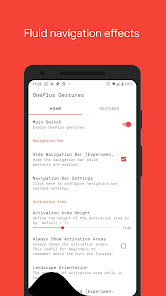
Fluid Effects
"Vivid Navigation Gestures" includes beautiful visual effects while performing gestures.
Multiple Gesture Triggers
• Bottom Left
• Bottom Center
• Bottom Right
• Left Top
• Left Center
• Left Bottom
• Right Top
• Right Center
• Right Bottom
Available Gestures
• Swipe up
• Swipe up and hold
• Swipe left
• Swipe left and hold
• Swipe swipe
• Swipe swipe right and hold
• Swipe swipe down
• Swipe swipe down and hold
• Hold
• Double Tap
• Tap
Available Actions
• Launch Google Assistant
• Back
• Home
• Menu
• Kill App
• Last App
• Open notifications
• Open power dialog
• Recent apps
• Open quick settings
• Toggle split screen
• Toggle auto rotation
• Toggle nav bar
• Launch apps
• Launch shortcuts
• Take screenshots
• Play/Pause your current track
• Skip to the next track
• Skip to the previous track
• Search
• Keycodes
• Input method picker
• Show volume controls
• You can request actions in my subreddit
Accessibility services
This app uses accessibility services to programmatically execute actions such as back, home or quick settings.
This app does not collect any data via accessibility services
Hide the navigation bar
"Vivid Navigation Gestures" allows you to hide your stock nav bar as long as the gestures are enabled.
You need ADB or Root in order to use that feature.
Android ADB PC instructions
1 - Enable Developer Mode in the Android settings.
2 - Enable USB Debugging
3 - Setup ADB on your PC
4 - Run the following adb command to grant the permission:
adb shell pm grant com.ivianuu.oneplusgestures android.permission.WRITE_SECURE_SETTINGS
To restore the navigation keys disable the app or run this command:
adb shell wm overscan 0,0,0,0
How to install ADB
Gadget Hacks - https://youtu.be/CDuxcrrWLnY
Lifehacker - https://lifehacker.com/the-easiest-way-to-install-androids-adb-and-fastboot-to-1586992378
Xda developers - https://www.xda-developers.com/install-adb-windows-macos-linux/
So what you're waiting get the next big thing now no matter which device you're using or which android version you're running.
Links:
Reddit:
https://www.reddit.com/r/manuelwrageapps/
Vivid Navigation Gestures使用ランク
使用ランクは、28日間の現在のインストール数とアクティブユーザー数を計算するSimilarwebのアルゴリズムに基づいています。
業界別 ウェブサイトカテゴリーで
米国--
ツールで
米国--



 Vivid Navigation Gestures VS.
 3月 30, 2026