

GS Weather 8 Watch Face のアプリ分析 5月28日

GS Weather 8 Watch Face
- GS Watchfaces
- Google Play ストア
- 有料
- 天気
🚨 Important Compatibility Note 🚨
This classic design is NOT compatible with newer Wear OS watches (like Galaxy Watch 7 or Pixel Watch 3).
Keep your favorite features! Add our famous live weather, tide charts, and custom data to your new watch with Wear OS Toolset:
https://play.google.com/store/apps/details?id=com.gs.complications.suite
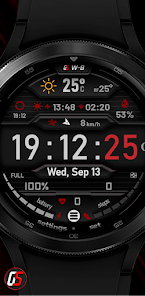
GS Weather 8 is an advanced weather watch face for Wear OS smartwatches with unique features and extreme customization, fully translated into 17 languages.
After installing, please take a moment and launch the quick guide found in the watchface settings menu, to better understand the watchface functions.
It is necessary to install this app on your mobile for the watchface to function properly. Please make sure to install it there first.
A phone app is needed for this watchface to function properly (get phone battery percentage and intercommunicate with the app below) This app acts as a service so you won't find it in your app launcher. Please make sure to install the mobile version first.
The watch face can be controlled from your phone (a separate application needs to be installed on your phone). This gives you the ability to control all watch face settings, backup and restore customizations, and receive notifications from the watch face when the battery drops to the level you have set, or your heart rate bpm reaches the limit you have set.
Download the Android companion app here https://play.google.com/store/apps/details?id=com.gs.watchfaces
The watch face has 2 main screens in which it shows all the information. The time, weather (chart) screen.
It also has an additional chart showing tides.
Tides are disabled by default, please enable tides from the watch face general settings if you need them.
Check the tap guide and/or quick guide to see how to get to each one of them.
Please take note that the weather info is only "shown" on the watch face, the data is provided by openweathermap.org. I do not have any responsibility for the weather conditions the watch face shows.
Tides info is taken from worldtides.info and as their disclaimer states:
“NO GUARANTEES ARE MADE ABOUT THE CORRECTNESS OF THIS DATA. You may not use it if anyone or anything could come to harm as a result of using it (e.g., for navigational purposes)”.
For any inquiries or problems, you may have, please contact me on social media or send me an email to mailto:support@gswatchfaces.com. I will be more than happy to assist you and hear your thoughts.
GS Weather 8 Watch Face使用ランク
使用ランクは、28日間の現在のインストール数とアクティブユーザー数を計算するSimilarwebのアルゴリズムに基づいています。
業界別 ウェブサイトカテゴリーで
米国--
天気で
米国--


 GS Weather 8 Watch Face VS.
 5月 28, 2026