

You’ve hit your search limit
Start your free trial to keep exploring full traffic and performance insights.
Get StartedAnalyse de l'application Smart Bookmark: Link Manager pour le 18 mai

Smart Bookmark: Link Manager
- lonesomebit
- Google Play Store
- Gratuit
- Productivité
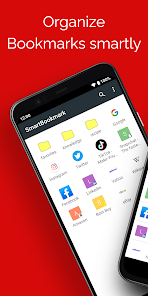
Smart Bookmark is an Android bookmark manager that works independently from browsers like Chrome and Firefox. Can’t find the page you saved? Keep your favorites organized exactly the way you like — with unlimited nested folders, easy sorting, and quick search. Perfect if you use multiple browsers. Because Smart Bookmark manages bookmarks on its own, you can use it with Chrome, Firefox, Opera, Dolphin, and many other browsers. Adding bookmarks is easy: Just choose “Add to Bookmark” from your browser’s Share menu. You can also add items manually from within the app. With Backup & Restore, you can move your bookmarks to a new phone anytime.
Main features
- Add bookmarks with one tap from the browser Share menu (works with Chrome and other standard Android browsers)
- Unlimited folder hierarchy (folders inside folders)
- Reorder items with drag & drop - Choose which browser to open links with (“Open in browser”)
- Search bookmarks - Backup & restore - Automatically fetch favicons
How to back up & restore
Backup
1. Open Smart Bookmark
2. Tap the menu (top right) → Settings
3. Tap “Backup”
4. Choose a save location and tap OK A file named “bookmark.json” will be created.
Restore
First, copy “bookmark.json” to the Android device you want to restore to. (Any method is fine: microSD, Dropbox, Google Drive, etc.)
1. Open Smart Bookmark
2. Tap the menu (top right) → Settings
3. Tap “Restore from backup”
4. Read the warning and tap OK
5. Select “bookmark.json” and tap OK Restore overwrites existing bookmarks. Please back up first.
Note
Due to Android restrictions, Chrome for Android can no longer read or write its bookmarks. Therefore, import/export to Chrome is not supported.
Rang d'utilisation de Smart Bookmark: Link Manager
Le classement d'utilisation est basé sur l'algorithme de Similarweb qui calcule les installations actuelles et les utilisateurs actifs sur une période de 28 jours.
Toutes les catégories dans
États-Unis--
Productivité dans
États-Unis--
Principaux concurrents & apps alternatives
Applications ayant une forte probabilité d'être utilisées par les mêmes utilisateurs, à partir du même store.

Turnbull Law Group

W18m: Test PR app 02
 Smart Bookmark: Link Manager VS.
 mai 18, 2026