

You’ve hit your search limit
Start your free trial to keep exploring full traffic and performance insights.
Get StartedAnálisis de la app Parental Control - ScreenTreat para 21 de mayo

Parental Control - ScreenTreat
- Screentreat, UAB
- App Store de Apple
- Gratis
- Educación
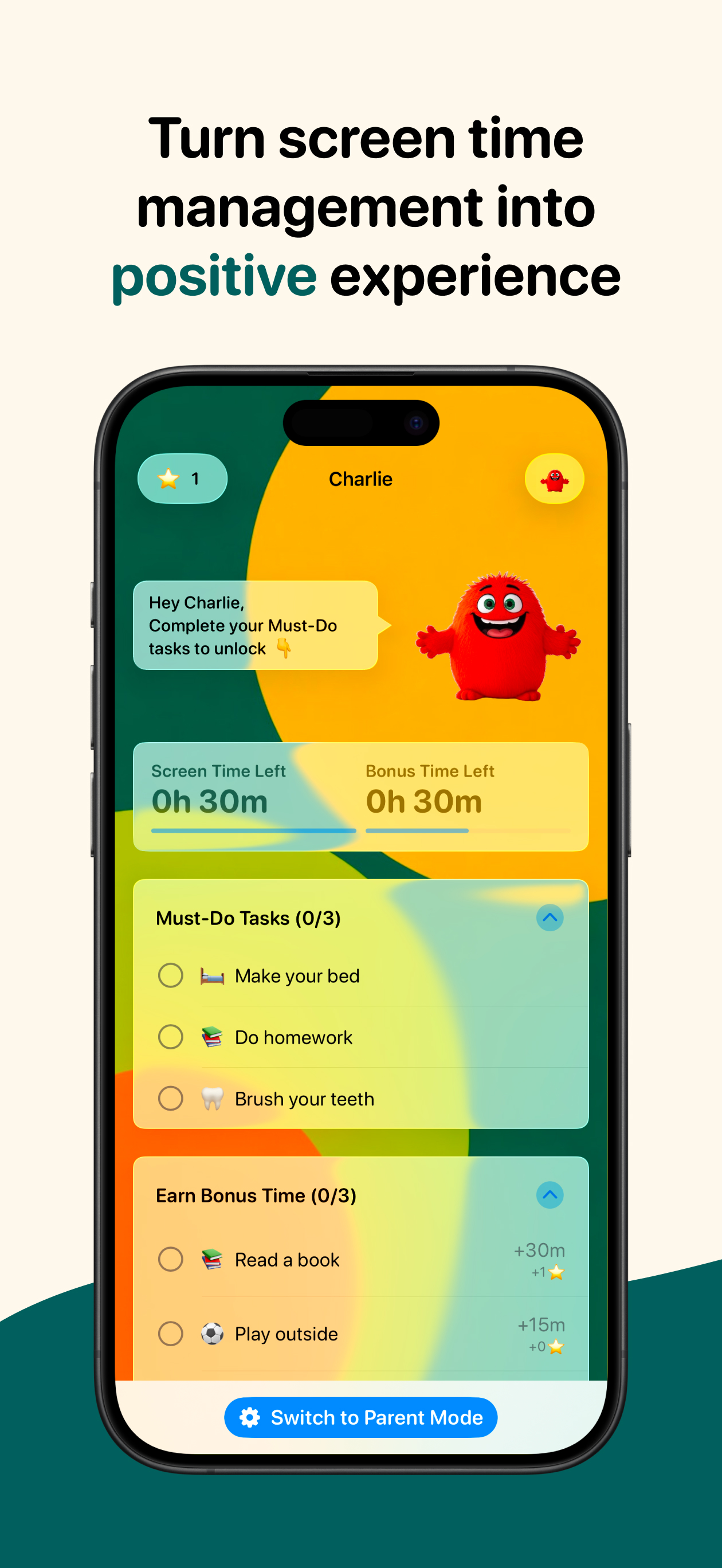
ScreenTreat helps families turn screen time into positive daily habits. Instead of constant battles, kids complete their must-do routines before unlocking their screen time.
Children can also earn bonus screen time and special stars, which can be redeemed for real-world rewards. Meanwhile, parents stay in full control - tracking progress, adjusting limits instantly, and managing tasks and schedules directly from their phone. Make screen time work for your family, not against it.
How It Works:
Parents set must-do tasks (e.g., chores, hygiene, homework) for kids to unlock regular daily screen time. Kids can also earn extra time for completing bonus tasks.
Parents set daily limits, bedtime, and other custom off-screen schedules, select apps to block, manage existing tasks, or create custom ones.
1. Install ScreenTreat: Download the app and select "kid" or "parent" device.
2. Pair parent and child device using QR code to enable family plan benefits and remote control (when applicable)
3. Set Up Parent Controls: allow screen time permissions, define screen time limits, assign daily tasks, and create bonus tasks for extra screen time.
4. Let Your Kids Complete Tasks: Kids unlock their screen time by finishing Must-Do tasks and can earn more by completing Bonus tasks.
Start motivating your child by turning their chores into screen time rewards!
Screentreat offers two paid subscription options
1. Single device plan.
Key Features:
- Unlimited Must-Do & Bonus Tasks: Kids earn screen time by completing required tasks, with bonus tasks for extra time.
- Customizable Rewards: Tailor tasks and rewards based on your child’s needs.
- Simple Parent Controls: Manage settings directly on your child’s device with a secure PIN code.
- Make it your own: choose your wallpaper, avatar, and nickname - kids love it!
- Block Unwanted Apps: Control which apps your child can access.
2. Family plan with remote management.
Key Features:
- Remote Management: Instantly block or allow unlimited time, add minutes, manage tasks, and set schedules from the parent device. Supports up to 5 iPhone or iPad devices under one plan.
- Unlimited Must-Do & Bonus Tasks: parents set must-do tasks to unlock regular screen time limit & create bonus tasks for kids to earn extra time.
- Customizable Rewards: Tailor tasks and rewards based on your child’s needs.
- Simple Parent Control: Easily manage settings both on your child’s device via parent pin code or using remote control.
- Make it your own: choose your wallpaper, avatar, and nickname - kids love it!
- Block Unwanted Apps: Control which apps your child can access.
- Cloud sync: Keep all devices updated automatically.
Both plans include a 10-day freemium version - choose your best option and try it FOR FREE!
How much daily screen time should I give?
We recommend a daily limit of 30 minutes based on age and completed tasks. For kids aged 6-12, the total screen time (including Must-Do and Bonus tasks) should not exceed 2 hours on weekdays and 4 hours on weekends.
Privacy:
We prioritize your family’s privacy and data security.
We do not, and will not, sell your data to third parties.
Screentreat contains no advertisements.
Your child’s screen time activity is strictly private and visible only to you.
Our Terms of Service and Privacy Policy are available here: https://screentreat.app/terms and https://screentreat.app/privacy
General terms of use are available here: https://www.apple.com/legal/internet-services/itunes/dev/stdeula/
Contact us:
If you have any questions or need help, contact us at hi@screentreat.app
Clasificación de tiendas
El Store Rank se basa en múltiples parámetros establecidos por Google y Apple.
Todas las categorías en
Estados Unidos--
Educación en
Estados Unidos--
Principales competidores & aplicaciones alternativas
Aplicaciones con una alta probabilidad de ser utilizadas por los mismos usuarios, desde la misma tienda.

Choreio

Right Routine: Chore Chart

Nick Academy

1Question Screen Time Control
 Parental Control - ScreenTreat VS.
 mayo 21, 2026