

You’ve hit your search limit
Start your free trial to keep exploring full traffic and performance insights.
Get StartedPDF to video converter app analytics for April 5
PDF to video converter
- Android Tools (ru)
- Google Play Store
- Free
- Tools
The PDF to Video converter will turn your pdf file into a video quickly and easily. It has become much more convenient to manage pdf documents on the device using the converter. View the list of available pdf files. Find the desired document in your storage using the quick search function. Select any pdf file from the device's storage to create a video. Convert and get a video series of frames from the pages of your catalog pdf file.
How to work in the application:
1. Find a pdf file from the list found on the device storage;
2. Select the processing parameters: JPEG or PNG;
3. Mark the pages of the file that you want to process in the video;
4. You can change the order of the pages that will be video frames after processing;
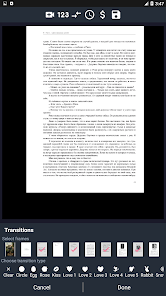
5. Add frame transition effects;
6. Adjust the duration of the frame playback and the transition between frames;
7. Save the video file to the device's internal storage or SD card;
8. You can give the file an original name;
9. Share videos with your friends.
The frame transition settings when converting to video will help you create unique effects for your video. In the PDF converter in the video, you can set such transition effects between frames as: circle, egg, rose, love, heart. And the settings for the duration of the transition between frames will help to make the transition effect more pronounced or vice versa less noticeable, starting from 1 second.
Managing documents from the device's storage using the PDF to Video Converter will become the original storage of images, photos or presentations. Choose PDF files on the main page of the application, convert and share the created videos with friends or share working presentations with colleagues.
For comfortable work in the application, you can disable ads for a nominal fee, thereby you will support the developer. Convert PDF to video and don't get distracted.
If you have any suggestions for the work of the PDF to Video Converter application, then you can write to us by email, we will definitely read and try to fulfill your wishes.
PDF to video converter Usage Rank
The usage rank is based on Similarweb's algorithm that calculates current installs and active users over a 28-day period.
All Categories in
United States--
Tools in
United States--
Top Competitors & Alternative Apps
Apps with a high probability of being used by the same users, from the same store.

NoteLedge - Digital Notebook

AI Resume Builder & CV Maker

Smallpdf: Scanner & PDF Editor

Document Reader, PDF Converter
 PDF to video converter VS.
 April 5, 2026