

Colorize Old Photos: Pholorize vs Colorize Images Usage & Stats
Turn your old, blurry, black and white photos into high resolution, enhanced and colorized using the AI photo enhancer with one tap.
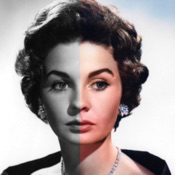
Pholorize is an AI photo colorizer app that colorize black and white pics automatically with its power from artificial intelligence. Pholorize mostly used to enhance and colorize old photo albums by more than 10000+ users and is recognized as one of the most known image colorizer apps. It has the capability to both enhance and colorize photos both in single and batch mode. So, you can basically scan an old photo album and add color to each photo instantly.
With this professional photo enhancer, you can easily enhance photo quality, unblur & sharpen images, and restore old photos to crystal-clear HD.
KEY FEATURES
Colorize and Restore Old Pictures
Add vibrant colors to any photo with single and batch photos modes. Colorize your old b & w family photos and memories and revive them again. With image restoration tool, first step is to enhance the photo quality by upscale the photo resolution, the second step is to remove the artifacts and finally the, AI will colorize the photo. By completing all three steps, you will restore old photos.
Improve Photo Resolution
Increase and upscale your pictures into HD photos without losing any detail.
Enhance Photo Quality
You can easily use ai photo enhancer by only selecting your photos with one
tap. The core of the enhancer relies on the powerful AI Enhancer technology the advantage of such technology brings face details and quality of photos in seconds.
Sharpen Details
Sharp and vibrant photos always look better compared to old photos. Pholorize makes it possible to edit and sharpen photos for also enhanced and colorized photos. You can easily adjust sharpen and vibrant settings.
Color Filters
Different type of prebuilt color filters make it easier to enhance both the colors of the photo and the picture itself. You can use this feature as a post-process tool after colorization.
Color Curves
Colorization process can be improved with the color curves. You can edit Red, Green, Blue and RGB channels seperately, it will generate better photos based on the quality of colors.
ADJUSTMENTS
With adjustments, you can edit all of the following list;
- Brightness - Contrast
- Saturation - Highlights - Shadows
- Tint
- Sharpness
Batch Colorization
What if you have an old photo album with lots of beautiful memories and photos, your heritage from back ? It is super easy with Pholorize, just select each captured image from your albums and that’s it! In a few seconds, you will find the beautiful memories back with it’s colorized version. It is pretty cool to see the old photos in AI improved quality.
We put constant work into Pholorize and continuously improving AI model and adding new features to make your experience better. Similar to popular tools like Remini, Pixelup, Topaz and PhotoApp our AI Photo Enhancer is also empowered by artificial intelligence to transform your old photos into high- resolution colorized images.
UNLIMITED ACCESS TO ALL FEATURES
– You can subscribe for unlimited access to all features.
– Subscriptions are billed automatically at the rate depending on the selected subscription plan.
- Terms of use: https://www.rayinformatics.com/terms
- Privacy policy: https://www.rayinformatics.com/privacy
Contact:
- Visit rayinformatics.com/contact for support and feedback.
- Apple App Store
- Free
- Photo & Video
Store Rank
- -
Rediscover Color with Colorize Images!
Transform black and white, grayscale, or night vision photos into vibrant color moments using advanced Machine Learning. Dive into the magic of automatic colorization and let Colorize Images breathe new life into old memories.
Simple, Intuitive, and Efficient:
- Select a photo from your gallery or share from other apps like Facebook, Twitter, Chrome, or Google Photos.
- Instant results, leveraging GPU servers for fast colorization without affecting your device’s performance.
- Share your colorized memories on social media or save them to your gallery with ease.
Powered by Cutting-Edge Technology:
- Based originally on the renowned DeOldify project, our app offers multiple machine learning models for top colorization results.
- Note: Colors may not always reflect historical accuracy due to the nature of black and white images.
Global Reach with Multilingual Support:
- Supports multiple languages, making it accessible to a global audience.
Flexible Pricing:
- Enjoy free colorizations by watching Ads.
- Subscription plans start at just $1.50/month for unlimited colorizations.
- Short-term access available: 8-hour access for $0.50.
Your Privacy is Our Priority:
- Photos are stored for only 24 hours and can be removed instantly with our 'Quick Removal' feature.
- Images are processed on remote GPU servers, ensuring quick and secure colorization.
We Value Your Feedback:
- Use the 'Report Bug' feature within the app or contact us directly with any issues or suggestions. Your input helps us improve.
Tips for Best Results:
- Ensure source images have good quality, contrast, focus, and correct orientation.
- Preprocessing like contrast correction or sharpening can enhance results.
Rediscover the colors of the past with Colorize Images. Download now and transform your memories!
Privacy Policy: https://colorizeimages.com/pp.html
Terms of Use: https://www.apple.com/legal/internet-services/itunes/dev/stdeula/
- Apple App Store
- Free
- Photo & Video
Store Rank
- -
 Colorize Old Photos: Pholorize VS.
  Colorize Images
January 18, 2026