

2月25日的IDmelon Authenticator应用程序分析

IDmelon Authenticator
- IDmelon Technologies Inc.
- Google Play 商店
- 免费
- 工具
Turn your smartphone into a USB FIDO2 security key that helps you go passwordless and keep your data safe on all devices.
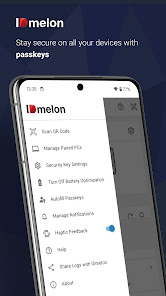
IDmelon enables you to turn your all-in-one smartphone into a FIDO security key. Once IDmelon is installed and activated on your smartphone, you will no longer deal with passwords on PC for login to Windows, online accounts, and applications. Instead, you will use passkeys for safer easier logins across all your devices without having to reregister credentials on every new device of yours. You can also use passkeys for login to accounts and applications on Android/iOS devices and iPad/tablets. This means that you can generate, store, and manage passkeys to access your data, anywhere, anytime, on any of your devices.
IDmelon is fully compatible with GitHub, Twitter, Facebook, Microsoft products and services such as Outlook, Office etc, as well as many more FIDO2 supported platforms.
To set up your smartphone as a security key or a passkey manager, you will receive an activation link/button via email. After the activation process on your smartphone has finished, your smartphone is ready to work in combination with either IDmelon Pairing Tool or IDmelon Reader.
You can pair your smartphone with PC via IDmelon Pairing Tool, which is a desktop/laptop app. To pair your smartphone with a PC, you need the IDmleon Pairing Tool installed on the computer first. Then, you scan a QR code on the PC screen only once, and from then on, a single tap on a push notification on your paired smartphone is enough to login!
Notice: IDmelon Pairing Tool is compatible with macOS and Windows 10 or later (Entra ID, formerly known as Azure AD, joined).
Permission notice: IDmelon Pairing Tool needs your permission to use smartphone camera only for the purpose of QR code scanning once to pair your smartphone with PC.
To enjoy the unique Tap & Login experience, however, you need IDmelon Reader, which is a plug and play hardware that can be plugged into USB ports on PCs. Workspaces with shared computers are great places to use IDmelon Reader. With a single tap of your smartphone on Reader, you will receive a notification to login.
Permission notice: To use IDmelon Reader, IDmelon app requires permission to access your smartphone's Bluetooth only for authentication purposes.
Sometimes, your work might roll out IDmelon and ask you to set up your smartphone as a security key when accessing certain files, emails, or apps. So, you will receive an invitation email containing an activation link/button. You need to first install the IDmelon app on your smartphone to be able to click on the link/button on the same device on which the app is installed. Or, you may be empowered to use your ID badge or NFC card as a FIDO security key for the same purpose. To find out more, visit our website: https://www.idmelon.com/
License Agreement can be found at: https://www.idmelon.com/end-user-license-agreement/
For the latest Privacy Policy, see: https://www.idmelon.com/privacy-policy/
IDmelon Authenticator 使用排名
使用率排名基于 Similarweb 的算法,该算法会计算 28 天内的当前安装量和活跃用户数。
所有品类在
美国--
工具在
美国--




 IDmelon Authenticator VS.
 二月 25, 2026