

You’ve hit your search limit
Start your free trial to keep exploring full traffic and performance insights.
Get StartedRemove & Add Watermark análises de aplicativos para 28 de março

Remove & Add Watermark
- WATER INC
- Google Play Store
- Gratuitos
- Editores e reprodutores de vídeo
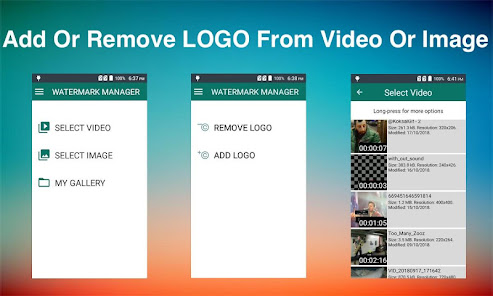
This app can be used to remove or add watermark to images and videos.
You can add watermark to images/videos using text and images with different options including animating the watermark.
You can also suppress a watermark by selecting its area(lasso or rectangle select) and app can remove it by interpolation of the surrounding pixels.This technique works almost perfectly on alpha-blend watermarks, or you can crop the region outside of watermark area, this works perfectly for media that has logo at edges.
HOW TO USE
✔As soon as you start the app it show you option to select image or video
✔After selection you are asked if you want to remove or add the watermark
✔If you select REMOVE LOGO option then you are taken to screen with preview and adjustable rectangle with actions(specify more than 1 areas) to specify the area of logo, in this screen can also click on Custom Duration button to specify duration for which to apply filter.You can also choose zoom option and pinch with fingers to better select small watermark area.
✔If you select ADD LOGO option then you are taken to screen with options to add text or images, here you can also customise each option, like change font, text,
colour, size or rotation.
✔ You can also use prefabricated images as watermarks or can save your specific settings as template, these templates can be applied to a different image or video later using 'saved template' option.
✔Press Save button and wait for process to complete and view or share the results.
All exports are saved in WATERMARK MANAGER folder in SD card root directory.You can also view the processed files using 'My Gallery' screen
FAQS
How to add more fonts
Copy font files(.ttf) into WATERMARK MANAGER->.fonts directory and app will pick those fonts from there.
How to animate watermark
Select the watermark you want to animate & click the A button in bottom bar & define settings e.g., duration & direction of watermark.
How to improve processed video quality
In edit screen(where you specify watermark area and other components) there is a gear icon on top right corner, please use slowest speed you have patience for and video quality will improve.
How to save my logo settings as template
After defining all logo settings(images, texts) click on top-right gear icon to open settings screen and then click "Save Template"->Give template name and you are done.
What are prefabricated LOGO
These are images that comes with app and can be added as watermarks, these can be loaded from settings screen.
What to do if there are more than 1 watermarks to remove
Use add (+) action button at the bottom bar to specify another watermark area.
Which videos formats are supported
Mainly Mp4 but your video is any other format then it is trans-coded to mp4.
Remove & Add Watermark classificação de uso
A classificação de uso é baseada no algoritmo da Similarweb que calcula as instalações atuais e os usuários ativos ao longo de um período de 28 dias.
Todas as categorias em
Estados Unidos--
Editores e reprodutores de vídeo em
Estados Unidos#794
Interesses dos Usuários e Principais Categorias
Principais categorias e aplicativos usados pelos usuários do Remove & Add Watermark
Principais Categorias
Afinidade
Principais Aplicativos Dentro da Categoria
Mais aplicativos
57%






17%

15%





8%

Principais concorrentes e aplicativos alternativos
Aplicativos com alta probabilidade de serem usados pelos mesmos usuários, da mesma loja.

Smart Video Crop - Video Cut

LightCut -AI Auto Video Editor

Video Converter Pro

Snaphouss
Remove & Add Watermark VS. março 28, 2026