

You’ve hit your search limit
Start your free trial to keep exploring full traffic and performance insights.
Get StartedRemoteView for Android analisi dell'app per 26 febbraio

RemoteView for Android
- RSUPPORT Co., Ltd.
- Google Play Store
- Gratis
- Strumenti
If you have any questions or require additional information, please contact us through https://content.rview.com/en/support/contact-us/. We will contact you as soon as possible. Thank you.
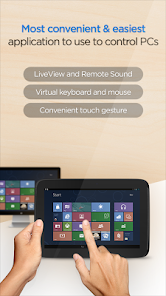
RemoteView is a service from Rsupport that lets you remotely control computers located either at home, at the office, or anywhere else as long as there is live Internet connection. All you have to do is this: (1) Install an agent on a computer you want to access remotely; (2) Install a RemoteView App on your smartphone or a tablet. Voila! You’re ready to start! You can use all the resource-heavy applications that usually require a full-on computer, from the convenience of a smartphone or a tablet by using RemoteView. That’s it!
[Special Features]
- Provides fast and safe remote control.
- File Transfer in both directions.
- Works under multiple network environments: Dynamic IP; DHCP, Private IP, Private and corporate firewalls.
- Improved security measures: Two-tier secured log-in process; ASE 256bit Encryption; SSL Security.
- Ease of Use: Assume control over a remote mouse and keyboard from mobile devices; Multi Touch, Scroll and Zoom are all supported.
- Language Input: Any language input method available on the remote computer will be supported.
- Common UX: You can use RemoteView from an iOS device as well as the Android OS device seamlessly.
- Virtual Environments Supported: Hyper-V; VMware; Virtual PC; Citrix Xen -- All supported.
- Other Notable Features: Multi Monitor Support; Screen Lock Out; Remote Power On/Off Via RemoteWOL.
[Rview Application Areas]
- When you want to recreate an office IT work environment.
- When you want to work at your office PC from home.
- When you want to access your files located at home from your office
- When you want to save files onto your PC from different places as you are on the move.
- When you have to have immediate access into your servers located inside a secure and hard to access places like the IDC.
- When you have a “One-to-Many” asset management needs.
[How To]
- Agent Installation Process
1. Go to rview.com from the computer you want to remote into.
2. Click on the Sign Up button and fill out the application form.
3. You have to complete your sign-up process by responding to a confirmation email sent to the email address you used in the sign-up process.
4. Log into your account at rview.com
5. While seated at the computer you wish to remote control, click on the Agent Installation button.
6. A download dialogue box should appear. Agree, download, launch the installation .exe and follow the instructions. The entire process should take less than 10 minutes to complete.
- Remote Control a Computer from a smart device
1. Go to the Android Marketplace and download the RemoteView App..
2. Launch the app and log into your account using your account ID and PW.
3. Click the remote computer you wish to control.
4. Initiate the remote control session using the ID and PW you assigned to the remote computer.
5. Wait for the connection to be established and start using RemoteView.
* Android OS 8.0~14.0 Recommended
RemoteView homepage: http://www.rview.com
Contact US: https://content.rview.com/en/support/
Online inquiry: https://content.rview.com/en/support/contact-us/
RSUPPORT homepage: http://rsupport.com
Ranking di utilizzo di RemoteView for Android
Il ranking di utilizzo si basa sull'algoritmo di Similarweb che calcola le installazioni correnti e gli utenti attivi su un periodo di 28 giorni.
Tutte le categorie in
Stati Uniti--
Strumenti in
Stati Uniti#8,443
Principali concorrenti e app alternative
App con un'alta probabilità di essere utilizzate dagli stessi utenti, provenienti dallo stesso store.

TAP Kiln Control Mobile

INTEGRA CONTROL

RealVNC Viewer: Remote Desktop
AT&T Personal Cloud
 RemoteView for Android VS.
 febbraio 26, 2026