

You’ve hit your search limit
Start your free trial to keep exploring full traffic and performance insights.
Get StartedAnálisis de la app Floating Multitasking para 26 de febrero
Floating Multitasking
- Geeks Empire
- Google Play Store
- Pagado
- Productividad
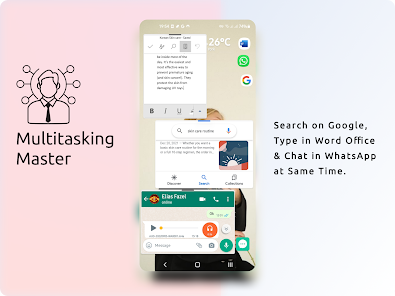
You are tired of constantly switching between apps, losing precious time and focus? Do you dream of true multitasking, seamlessly managing multiple tasks at once? Floating Multitasking is here to revolutionize the way you work and play on your Android devices.
Download Floating Multitasking and experience the true multitasking!
Easy and Quick Multitasking With Floating Multitasking
Open all apps in floating windows from floating shortcuts. And Super charge your productivity with floating widgets, floating folders
When we are working with several applications, there are too many small actions that may affect our time management and distract us. You have to do 8 or even more steps!
1️⃣ To switch in to Keep Note you should close Zoom,
2️⃣ Back to the App Drawer
3️⃣ or Home Screen
4️⃣ Find Keep Note among many applications.
5️⃣ Click for opening and taking note
6️⃣ Then close note taking
7️⃣ After that you can come back to Zoom!
8️⃣ Oops! You Should take another note! OMG! Repeating this again & again is waste of the golden time! 😤 😴
You do these actions many times per day with different applications without releasing how much time you are wasting.
Stop switching, start multitasking. Download Floating Multitasking today and experience the future of mobile productivity!
How Does This Application, Floating Multitasking, Helps You?
It makes Floating Shortcuts of all applications to have a quick access to them and open applications in Floating Windows.
How Does It Work?
First Step; Open Floating Multitasking application and Click to create Floating Shortcuts of applications. That’s It! 😎
Also, there is a fast Search Engine to find an app quickly
All of us have many applications. So, to find one of them in a long list is frustrating. Quickly locate and create floating shortcuts for any app with our integrated search engine.
Secure Floating Shortcuts
Protect Your Digital Life with Your Fingerprint
Privacy and security is very important to all of us. we should protect our personal messages, important data, online wallets & etc. You can lock every Floating Shortcut with a pattern or fingerprint.
Floating Widgets
Widgets can be very handy as they allow you to put your favorite applications on your home screen in order to quickly access them. Now if they be floating, you can see and use them everywhere.
Floating Multitasking Tutorials
https://www.youtube.com/watch?v=cEeaajEFL1k&list=PLTs5v2BrWyWkStqKF9_9R3ewgR3AifcZO
Note: I recommend this to all users with higher IQ 😎
Disclaimer: Floating Shortcuts and Floating Widgets are easy to configure. Extended Floating Apps feature required pro users.
ℹ️ Accessibility Service Permission Have Used To Create Multi-Windows & Open Applications in Split Screen Simultaneously.
Clasificación del uso de Floating Multitasking
El rango de uso se basa en el algoritmo de Similarweb que calcula las instalaciones actuales y los usuarios activos durante un periodo de 28 días.
Todas las categorías en
Estados Unidos--
Productividad en
Estados Unidos--
Intereses de los usuarios & Top categorias
Principales categorías y aplicaciones utilizadas por los usuarios de Floating Multitasking.
Categorías principales
Afinidad
Principales aplicaciones de la categoría
Más aplicaciones
49%




27%





7%

4%

Principales competidores & aplicaciones alternativas
Aplicaciones con una alta probabilidad de ser utilizadas por los mismos usuarios, desde la misma tienda.

Zenkit

Swift Backup

Floating Apps (multitasking)

Sesame Search & Shortcuts
Floating Multitasking VS. febrero 26, 2026