

You’ve hit your search limit
Start your free trial to keep exploring full traffic and performance insights.
Get StartedHecate - PC Remote Control app analytics for March 28

Hecate - PC Remote Control
- Risefall
- Google Play Store
- Free
- Tools
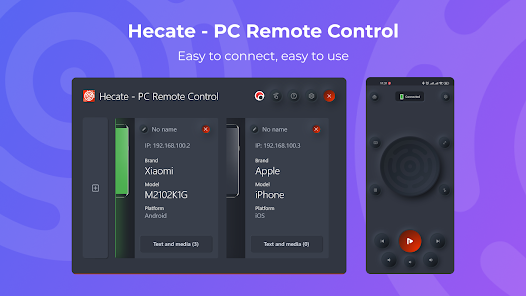
Hecate - PC Remote Control is a simple and user-friendly application that allows you to easily control your PC from your phone. With Hecate, you can remotely control the mouse and keyboard on your computer, launch applications, control the volume and playback of media, send links and text from your phone to your computer, and access the history of sent data.
Here's a closer look at some of the key features of Hecate:
• Mouse control:
With Hecate, you can control the mouse on your computer using your phone. You can click the left and right mouse buttons by tapping on the touchpad area, and you can use two-finger swipes to simulate mouse wheel up/down movements.
• Type text from your phone:
Hecate allows you to type text on your phone and have it instantly appear on your computer's screen. Simply click on the keyboard icon in the app and start typing.
• Launch applications from the taskbar:
Hecate makes it easy to launch applications on your computer that are pinned to the taskbar (to the right of the start button). You can simply select the application from the Hecate app on your phone and it will open on your computer.
• Computer volume control:
Hecate allows you to adjust the volume on your computer directly from your phone. You can also use Hecate to control the playback of media on your computer, with the ability to skip tracks, play/pause, and more.
• Sending links from phone to computer:
Hecate makes it easy to send links from your phone to your computer. Simply click on the "Share" icon in any browser on your phone and select Hecate - PC Remote Control. The link will immediately open in a browser on your computer.
• Send text from phone to computer:
With Hecate, you can easily send text from your phone to your computer. Simply highlight the text you want to send, click on the ellipsis, then click on the "Share" icon and select Hecate - PC Remote Control. The text will be copied to your computer's clipboard.
• Access to the history of sent data:
Hecate keeps a record of all the data that you have sent from your phone to your computer, so you can easily access it later.
• Connecting multiple devices:
Hecate allows you to connect multiple devices to your computer, so you can control your PC from multiple phones if you want.
To use Hecate - PC Remote Control, your phone and PC must be on the same network. For example, if your computer is connected to your home network via cable or Wi-Fi, your phone must also be connected to the same Wi-Fi network in order to use Hecate.
Overall, Hecate - PC Remote Control is a versatile and convenient app that allows you to easily control your PC from your phone. You can download Hecate - PC Remote Control for your computer from the Windows Store.
Install Hecate - PC Remote Control for your computer from Windows Store:
https://apps.microsoft.com/store/detail/hecate-pc-remote-control/9MXQTF885MJP
Hecate - PC Remote Control Usage Rank
The usage rank is based on Similarweb's algorithm that calculates current installs and active users over a 28-day period.
All Categories in
United States--
Tools in
United States--
Top Competitors & Alternative Apps
Apps with a high probability of being used by the same users, from the same store.

ZUMIMALL

ROUVY Companion App

Castro Premium - system info

Excelmind: PQ Simulator
 Hecate - PC Remote Control VS.
 March 28, 2026