

D310 Classic Analog Face vs CNRwatch040 Usage & Stats
D310 Classic Analog Face
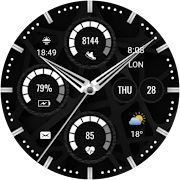
A clean, classic analog watch face designed for users who prefer a traditional style with practical daily features. The D310 includes essential health and activity tools such as steps count, heart rate, and battery level, along with multiple quick-access shortcuts for faster navigation throughout your day.
• Steps count
• Day of month & weekday
• Heart rate measurement
• Battery level indicator
• Quick access to Phone & Messages
• Quick access to Alarm & Music
• Quick access to Samsung Health
📲 Compatibility
Works with all smartwatches running Wear OS 3.5+, including:
Samsung Galaxy Watch 4, 5, 6, 7, 8 & Ultra
Google Pixel Watch (1 & 2)
Fossil, TicWatch, and more Wear OS devices
⚙️ How to Install & Customize
Open Google Play Store on your watch and install directly
Long press the watch face → Customize → Set colors, hands & complications
🌐 Follow Us
Stay updated with new designs, offers, and giveaways:
📸 Instagram:
https://instagram.com/yosash.watch
🐦 Twitter/X:
https://x.com/yosash2
▶️ YouTube:
https://www.youtube.com/@yosash6013
📘 Facebook:
https://facebook.com/yosash.watch
💬 Telegram:
https://t.me/yosash_watch
🌍 Website:
https://yosash.watch
💬 Support
📧 yosash.group@gmail.com
- Google Play Store
- Paid
- Personalization
Store Rank
- -
Digital Clock
Dual Time - Date
1 Complication
6 Color Option
Sunrise - Sunset
Steps Shortcut
Pulse Shortcut
Battery Shortcut
Message Shortcut
INSTALLATION NOTES:
1 - Companion App;
Make sure the watch is properly connected to the phone, open the app on the phone, tap the image and then follow the instructions on the watch.
OR
2- Play Store Application;
Select your upload time from the drop-down menu to the right of the upload button.
After a few minutes, the clock dial will be set. You can select the clock view from the Add clock view option.
Note: Don't worry if you get stuck in the payment cycle, only a single payment will be made, even if you are asked to pay a second time. Wait 5 minutes or restart your watch and try again.
There may be a synchronisation issue between your device and Google servers.
Please note that problems on this side do NOT depend on the developer. The developer has no control over the Play Store from this side.
Please enable sensors and complication data retrieval permissions manually for full functionality!
Thank you!
- Google Play Store
- Paid
- Personalization
Store Rank
- -
 D310 Classic Analog Face VS.
  CNRwatch040
February 25, 2026