

You’ve hit your search limit
Start your free trial to keep exploring full traffic and performance insights.
Get StartedCamera Control from Wear Watch app analytics for March 5

Camera Control from Wear Watch
- JT Lab
- Google Play Store
- Free
- Tools
Want to control the phone camera remotely?
Camera Control from Wear Watch app is here to help you out!
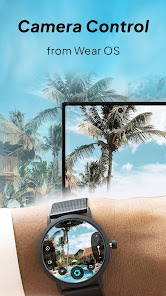
This Camera Control from Wear Watch app is a convenient and user-friendly app. It allows you to effortlessly capture photos & videos. You can easily control your smartphone's camera directly from your Wear OS smartwatch.
Imagine being able to capture the perfect group photo without needing to rush into the frame or ask someone else to take the picture. With Camera Control from Wear Watch, you can remotely trigger the shutter from your wrist, ensuring that everyone is included, and no moment is missed. This is particularly useful for group selfies or capturing shots in challenging environments where it's difficult to reach your smartphone.
Camera Control from Wear Watch seamlessly connects your smartwatch to your smartphone, utilizing Bluetooth technology to establish a reliable connection.
With the help of this camera remote control app, you can preview, and capture photos and videos. With the help of the wear smartwatch, you can switch the front and back cameras for capturing photos and videos.
You can take photos with the timer. Select and set the timer from 3, 5, and 10 seconds. Enable the flashlight from the wristwatch.
Setting Options:
- ON/OFF the full preview
- Enable the visibility of skin thumbnail
- Select the aspect ratio
Whether you're an avid photographer, a casual selfie enthusiast, or someone who simply wants to make their photography experience more convenient and enjoyable, Camera Control from Wear Watch is the perfect companion. It empowers you to capture high-quality photos with ease, giving you more freedom to explore your creativity and take memorable shots.
Download Camera Control from Wear Watch today and discover the joy of remote camera control right from your wrist. Elevate your photography game and never miss a perfect shot again.
Camera Control from Wear Watch Usage Rank
The usage rank is based on Similarweb's algorithm that calculates current installs and active users over a 28-day period.
All Categories in
United States--
Tools in
United States#5,602
Users Interests & Top Categories
Top categories and apps used by Camera Control from Wear Watch users
Top categories
Affinity
Top apps within the category
More apps
21%





14%





13%




9%




Top Competitors & Alternative Apps
Apps with a high probability of being used by the same users, from the same store.

InstaVision: Smart & Safe Home

Frameo: Share to photo frames

POV – Disposable Camera Events

VeryFit
Camera Control from Wear Watch VS. March 5, 2026