




Muse app breakdown: what Meta's AI agent means for brands
by Noam Kadyshevitch5 Min.
Oct 29, 2026
 Marketing Intelligence
You might be ranking. That doesn’t mean anyone is clicking.
More and more searches end without the person clicking on any result. Google answers the question directly on the results page, the user gets what they came for, and they move on. That’s a zero-click search, and in 2026 it’s not a fringe case, it’s the default outcome for a huge share of queries.
This piece breaks down what’s driving it right now, where it’s heading next, and what actually to do about it.
A zero-click search happens when the search engine results page (SERP) already contains the answer, so the user never clicks through to any site.
The clearest example: search “what’s the capital of Sweden” and Google hands you “Stockholm” instantly, no trip to Wikipedia required.
Similarweb data on that exact keyword shows an 85% zero-click rate on 10.3K monthly searches, and even the remaining 15% barely converts to clicks: only 149 actually landed on a website, a fraction of what that share should produce. The zero-click rate is really a floor, not the whole picture.
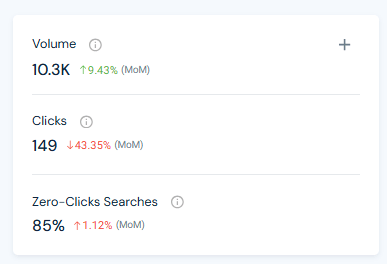
One clarification worth making up front: almost no keyword gets literally zero clicks. Every SERP serves a mix of intents, and some share of searchers always click through to dig deeper. When we say a keyword has a “zero-click rate,” we mean the percentage of searches on that keyword that end without a click, not that every single one does.
As Google keeps expanding what it can answer directly, the SERP is turning into the destination rather than the doorway. That’s not a new story. It’s an old trend that has picked up high speed.
Six SERP features do most of the work here. Understanding which one you’re up against changes how you optimize for it.
Google’s AI-generated summaries pull information from multiple sources into a single answer at the top of the page. Because the response is already synthesized and prominently placed, most users never feel a need to click through. Many AI Overviews now read like a compressed blog post: a definition, a “key characteristics” section, benefits, drawbacks, structured exactly like the article a user would otherwise have clicked to read.
These pull a specific passage from a ranking page and surface it at the top of the results. Unlike an AI Overview or a direct answer box, a featured snippet keeps its blue link, so Google is still counting on some users to click through for more depth.
For factual queries (conversions, dates, calculations), Google shows the number and nothing else. There’s no link because there’s nothing more to click.
For people, places, and organizations, Google assembles an at-a-glance profile from structured sources like Wikipedia. It’s positioned to answer the “who/what/where” before the user ever scrolls.
A stack of expandable questions related to the original query, each revealing a snippet-style answer. Users often work through several PAA entries and leave satisfied without visiting a single page.
Local business searches surface a map and a list of nearby options with hours, reviews, and directions already visible. Even when a user taps a result, Google frequently expands that business’s profile inside the SERP itself rather than sending them anywhere, so it still counts as zero-click.
Zero-click search is specifically a SERP phenomenon, it’s defined by what happens on Google’s results page. But the same underlying outcome, a query getting resolved with no visit to any website, is also happening at scale somewhere with no SERP at all: AI chat.
Based on the Similarweb 2026 Generative AI Landscape report, Gen AI platforms (ChatGPT, Gemini, Claude, and the rest) now pull roughly 9.5 billion visits a month worldwide, up 70% from a year earlier. Meanwhile, the web’s “Search Engines” category, the traditional home of query volume, grew barely at all over the same period. That doesn’t prove one is stealing from the other, but it does mean a lot more query-like activity is now happening somewhere that has no SERP, and therefore no click to measure in the first place.
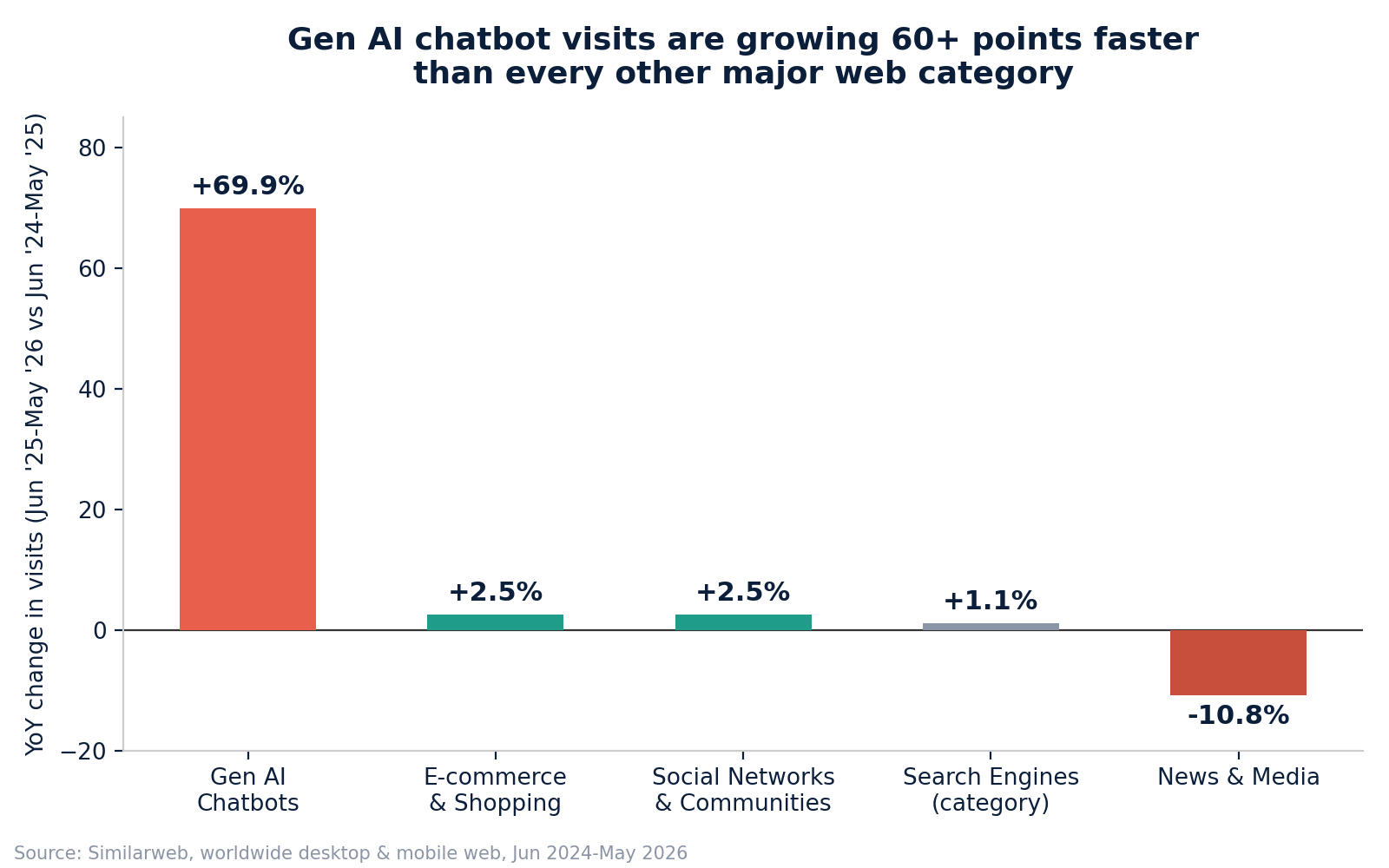
The insight that matters here isn’t the raw growth number, it’s what that growth is made of. A chat window almost never links out the way a SERP does. When it does, it’s rare enough to be notable on its own.
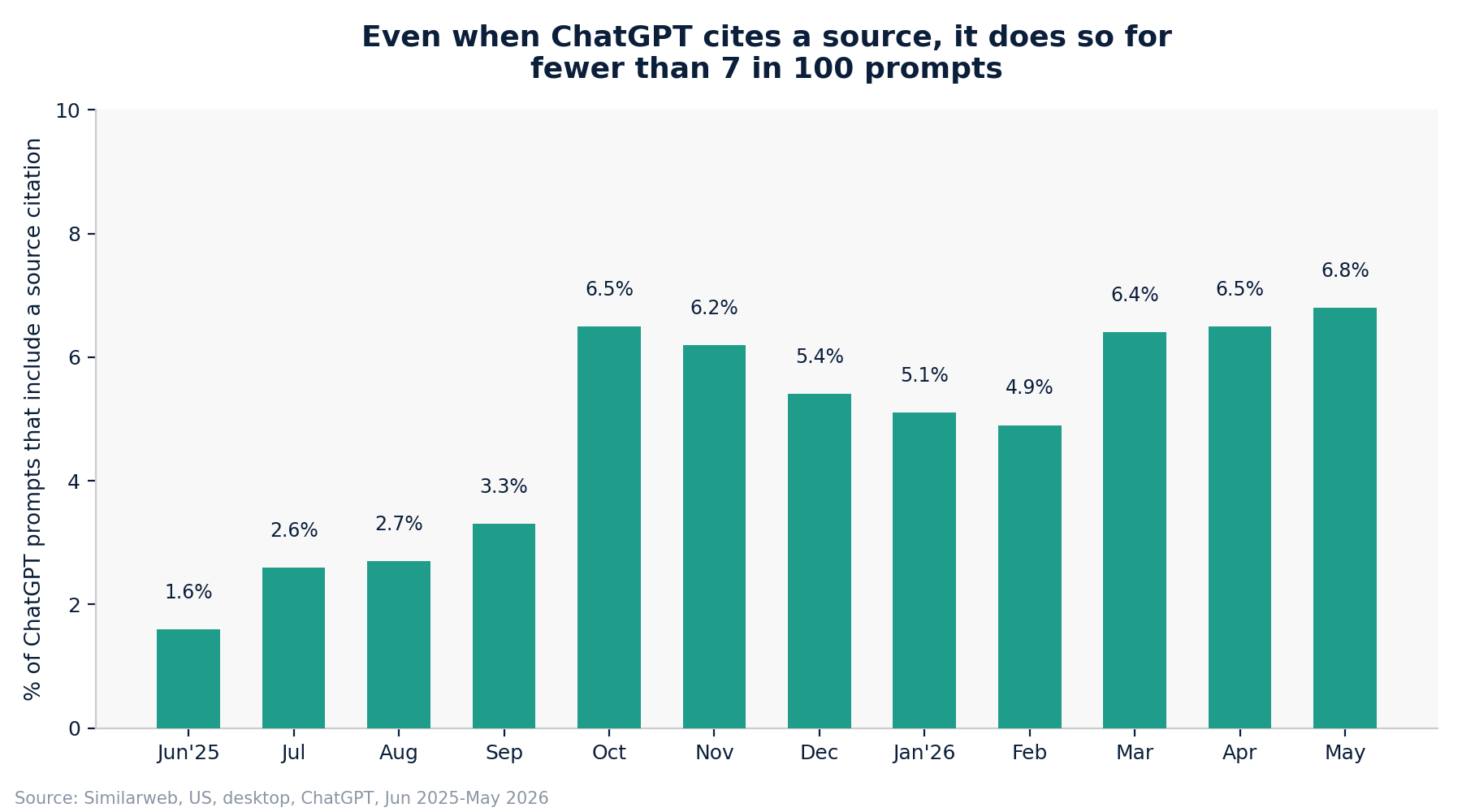
Even after nearly a year of steady growth, fewer than 7 in 100 ChatGPT prompts include any citation back to a source at all. Compare that to Google’s SERP, where even the most aggressive AI Overview still shows a “sources” panel on nearly every result. The practical read: AI chat produces the same no-visit outcome as a zero-click search, just more often, and without a SERP, a source panel, or anything resembling a click to begin with.
Zero-click searches aren’t a loss to write off. They’re a different kind of opportunity: capturing attention and trust inside the results page itself, even when a visit never happens.
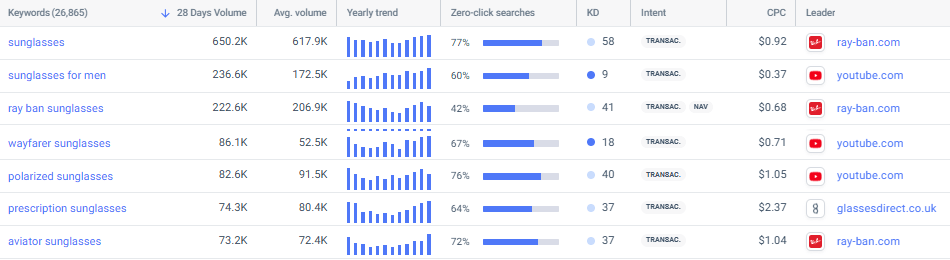
You can’t fix what you can’t see. Use Similarweb’s Keyword Research tool to pull zero-click rates alongside your usual keyword data. Searching “sunglasses,” for example, surfaces the head term at a 650.2K monthly volume and a 77% zero-click rate, alongside close variants like “polarized sunglasses” (76%) and “aviator sunglasses” (72%). That’s the read you need before you invest in a keyword: a high-volume term with a high zero-click rate is telling you upfront that ranking #1 won’t translate into the traffic the volume implies.
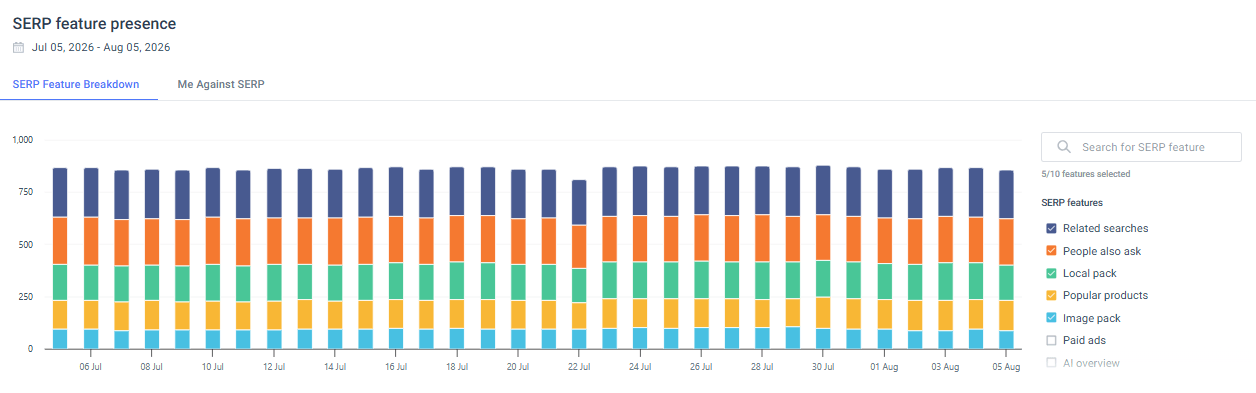
If you’re already running a rank tracking campaign, open Similarweb’s Rank Tracker and check the SERP Features report. The SERP Feature Breakdown view shows which features are showing up across your tracked keywords over time, useful for spotting a shift before it shows up in your traffic.
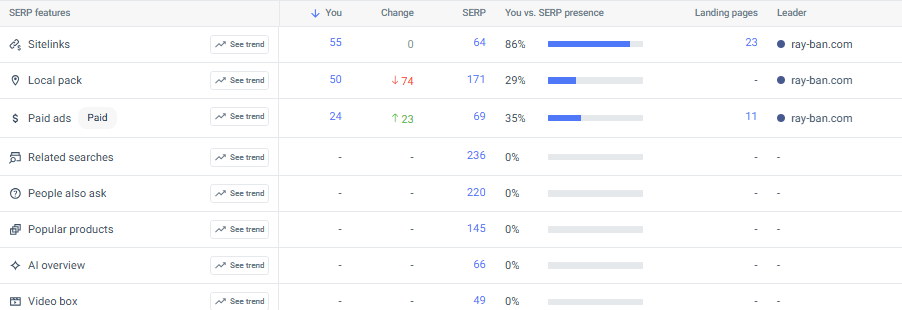
Then scroll to the “Breakdown by SERP Feature” table, which is where the real prioritization happens. For ray-ban.com, the pattern is stark: the domain has strong presence on Sitelinks (86% vs. SERP), Local Pack (29%), and Paid Ads (35%), all features tied to branded, navigational searches. But on Related Searches, People Also Ask, Popular Products, AI Overview, and Video Box, presence is flat at 0%, despite those features appearing on 236, 220, 145, 66, and 49 tracked keywords respectively. The “You” column being empty while the “SERP” column has real numbers is exactly the gap this report is built to surface. The AI Overview row alone represents 66 keywords where ray-ban.com isn’t appearing at all, that’s your priority list.
Once you know your target keywords, look at what’s already winning that SERP feature and reverse-engineer the pattern. If a competitor’s page is what’s populating the AI Overview for your target query, click through and look at how the content is structured; then apply the same structural logic to your own page.
A few things consistently help across features:
AI Overviews are now the single biggest driver of zero-click growth on Google, so they deserve dedicated attention rather than incidental optimization. Prioritize:
Treat these four as a standing checklist for every high-value page, not a one-time audit. AI Overviews get rebuilt from whichever pages best satisfy them at any given moment, so consistency across all four earns a seat at that table far more reliably than nailing just one.
Zero-click features consistently favor the freshest, most relevant version of an answer. Audit your top-performing pages on a regular cadence: refine an answer, update a stat, expand a thin FAQ. Small edits compound, because as Google’s ranking systems lean further into AI synthesis, fresher content has a real, measurable edge at getting pulled into that synthesis in the first place.
Zero-click search isn’t a temporary side effect of a few SERP features. It’s the current shape of search itself, on Google and now well beyond it. Gen AI platforms are pulling in visits at a pace no other web category is close to matching, and citations back to any source are still the exception rather than the rule. Ranking is no longer the finish line. Being the answer, wherever that answer gets served, is.
None of that makes SEO optional. It makes it more specific: find the keywords already going zero-click on you, build content that fits the format winning each SERP feature, and treat AI Overview as its own workstream instead of an afterthought. Do that, and the traffic you can’t get back stops mattering as much as the trust and visibility you can still build in its place.
What is a zero-click search?
A zero-click search happens when a user gets their answer directly on the search results page and never clicks through to a website. AI Overviews, featured snippets, knowledge panels, and similar SERP features are the main drivers.
How common are zero-click searches in 2026?
Very common. Even a single, definitive query like “capital of Sweden” carries an 85% zero-click rate in Similarweb’s own tracking, and that’s before counting the growing share of queries that go to AI chat instead of Google entirely.
Do AI chat platforms like ChatGPT create the same zero-click outcome?
Yes, and even more often. Similarweb data shows fewer than 7% of ChatGPT prompts included any source citation as of May 2026. Technically that’s not a “zero-click search” since there’s no SERP involved, but it’s the same practical outcome: no visit, no source credited.
Can zero-click searches still help my brand if nobody clicks?
Yes. Appearing in an AI Overview, a featured snippet, or a cited AI chat answer still builds brand recognition and trust at the moment someone is deciding, even without a visit. That’s the core idea behind treating visibility, not clicks, as the metric that matters.
How do I find out which of my keywords are losing clicks to zero-click features?
Start with Similarweb’s Keyword Research tool to see zero-click rates for the keywords already driving your traffic, then use the Rank Tracker’s SERP Features report to spot exactly which of your target keywords trigger an AI Overview where you’re not yet appearing.
What’s the difference between zero-click search and zero-click marketing?
Zero-click search describes the user behavior covered in this article: the SERP or AI answer resolves the query without a click. Zero-click marketing is the strategic response to it, and it goes a layer further into questions like agentic search (when an AI agent handles the whole task without a human searching at all).

Senior SEO Specialist at Similarweb
Maayan is a senior SEO specialist with 7+ years of experience in SEO. She loves complex research projects, creating SEO strategies and performing technical audits.
Muse app breakdown: what Meta's AI agent means for brands


What Is Retail Intelligence? How It Works and Why It's Essential to Digital Commerce
Give it a try or talk to our marketing team - it’s free!
